This site uses cookies to enhance your user experience. By clicking any link on this site you are giving your consent to our cookie policy. Read more
Reject
Accept All

Advertiser and Editorial Disclosures

Battle.net

Battle.net

verified Verified App

Developer: Blizzard Entertainment, Inc.

  • category

    Category: Entertainment

  • price

    Price: free

  • age rating

    Age Rating: Everyone

  • rating

    Rating: 3.6

  • download

    Downloads: 10,000,000+

  • version

    Version: 1.29.1.38

Screenshot 1
Screenshot 2
Screenshot 3
Screenshot 4
Screenshot 5
Screenshot 6

Features & Highlights

Cross-Game Integration

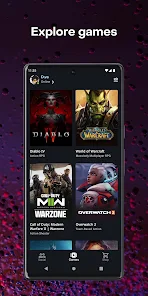
Battle.net allows seamless integration across various Blizzard games, enabling players to access their friends list, achievements, and game libraries all in one place. This interconnected experience enhances social interactions and simplifies switching between games, making it easier to jump into action with friends anytime.

Friend Management

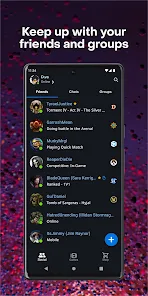
With an intuitive friend management system, Battle.net makes it simple to connect with friends, join parties, and communicate through voice chat or text. This feature fosters a vibrant gaming community, allowing players to stay in touch and coordinate gameplay sessions effortlessly, regardless of which game they’re playing.

In-Client Store

The Battle.net app features a robust in-client store where players can purchase games, expansions, and in-game items without leaving the platform. This convenient shopping experience ensures that players can quickly find and acquire the latest content from their favorite Blizzard titles, enhancing their overall gaming experience.

Regular Updates and Events

Battle.net hosts regular updates and seasonal events for its games, keeping the content fresh and engaging. Players can look forward to new challenges, limited-time rewards, and community events that not only provide exciting gameplay but also strengthen player connections within the Blizzard ecosystem.

Pros & Cons

Pros
  • Seamless integration with Blizzard games
  • User-friendly interface for easy navigation
  • Regular updates ensure optimal performance
  • Robust social features for connecting with friends
  • Exclusive deals and promotions for members
Cons
  • Frequent server outages disrupt gaming experience
  • Limited regional availability affects player access
  • Cluttered interface can be confusing for users
  • Strict account security can hinder quick access

Real Experience Using Battle.net

Application Scenarios

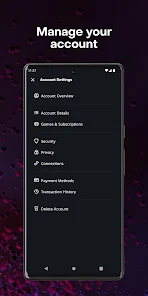
The Battle.net app serves as a comprehensive hub for Blizzard Entertainment's extensive library of games, including popular titles like World of Warcraft, Overwatch, and Hearthstone. Players use this app to access their favorite games seamlessly, manage their accounts, and connect with friends. The app is particularly beneficial during gaming sessions, as it allows users to launch games quickly, receive important notifications about in-game events, and participate in community discussions. Additionally, Battle.net facilitates cross-platform gaming, enabling players to connect with others regardless of the device they are using. Whether you're a casual gamer diving into Hearthstone or a hardcore enthusiast raiding in World of Warcraft, the app offers tailored features to enhance your gaming experience.

User Experience

The user experience of the Battle.net app is designed with gamer convenience in mind. The interface is clean and intuitive, making navigation straightforward for both new and experienced users. Upon launching the app, players are greeted with a personalized dashboard that showcases their library, recent news, and social interactions. The integration of voice chat and text messaging allows for fluid communication with friends and teammates, fostering a sense of community. Moreover, the app's performance is generally stable, with minimal loading times, ensuring that users can jump into their games quickly. However, some users have reported occasional connectivity issues, which can disrupt gameplay. Overall, the app successfully creates a cohesive ecosystem for Blizzard fans, enriching their gaming experience.

Pricing

The Battle.net app itself is free to download and use, which is a significant advantage for gamers looking to explore Blizzard's offerings. However, many of the games available on the platform come with their own price tags, as well as potential in-game purchases. For example, while players can access free-to-play titles like Hearthstone and Overwatch, premium games such as World of Warcraft require an upfront purchase and a subscription fee for ongoing access. This pricing model allows players to choose how much they want to invest in their gaming experience, catering to a variety of budgets and preferences.

Updates & Support

Blizzard Entertainment is known for its commitment to regular updates and community support, and the Battle.net app is no exception. Users can expect frequent updates that not only introduce new features but also enhance the app's performance and security. The support team is responsive, providing assistance through various channels, including a comprehensive FAQ section, forums, and direct customer service. Players can easily report issues or seek help, ensuring that their gaming experience remains smooth. Furthermore, Blizzard actively engages with its community, often incorporating user feedback into future updates, which strengthens the relationship between the developers and players.

verified Security & Privacy Review

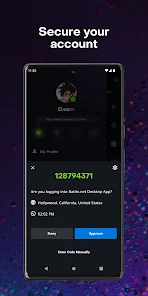
The Battle.net app prioritizes user security and privacy through robust measures designed to protect personal information. Users are required to create strong, unique passwords, and the app supports two-factor authentication to add an extra layer of security. This feature helps prevent unauthorized access to accounts, ensuring that only the rightful owner can log in. In terms of data handling, Battle.net adheres to strict privacy policies, clearly outlining how user data is collected, used, and stored. The app ensures that personal information, such as payment details and gaming activities, is encrypted during transmission, reducing the risk of data breaches. Additionally, users can manage their privacy settings, controlling what information is shared with other players and third-party services. Permissions requested by the app are generally limited to those necessary for its core functionalities, such as notifications and access to device storage for game downloads. Overall, the Battle.net app demonstrates a strong commitment to user security and privacy, making it a reliable choice for gamers concerned about their data safety.

Reviews

3.6

“Great platform for Blizzard games and friends.”

“Frequent updates keep the app running smoothly.”

“User interface is intuitive and easy to navigate.”

“Occasional bugs, but support team is responsive.”

“Love the integration with multiple games and services.”

FAQ

1

Does Battle.net collect my personal data?

Yes, Battle.net collects personal data to enhance user experience, improve services, and for account security. You can review their privacy policy for more details on data collection and usage.

2

Does Battle.net offer a free trial or free version?

Battle.net does not offer a general free version, but some games may have free trials or free-to-play options available. Check the specific game for details.

3

Does Battle.net require an internet connection?

Yes, Battle.net requires an internet connection to access its services, play online games, and receive updates.

4

How can I contact support or send feedback for Battle.net?

You can contact Battle.net support through their official website, where you can submit a ticket or access FAQs, and you can also provide feedback through the same platform.

5

How do I manage or cancel my Battle.net subscription?

You can manage or cancel your subscription through your Battle.net account settings on the official website or app, where you can view your subscriptions and make changes.

How to use Battle.net

1

How can I find my customer number on Battle.net?

Your customer number is typically found in your account settings under "Account Details."

2

How can I recover a hacked Battle.net account?

Visit the Battle.net support page and follow the steps for account recovery, including resetting your password and securing your email.

3

How do I activate my Battle.net account?

If you have a code, log in to the Battle.net app, go to "Account Settings," and select "Redeem Code" to activate it.

4

How do I change my email address on Battle.net?

Log in to your account, go to "Account Settings," and select "Change Email" to update your email address.

5

How do I contact Battle.net customer service?

You can reach Battle.net customer service through their support website or by using the in-app help feature.

Editor's Choice