This site uses cookies to enhance your user experience. By clicking any link on this site you are giving your consent to our cookie policy. Read more
Reject
Accept All

Advertiser and Editorial Disclosures

B-hyve

B-hyve

verified

B-hyve

4.7
Rating
500,000+ Downloads
3.0.52 Version
  • category

    Category: House & Home

  • price

    Price: free

  • age rating

    Age Rating: Everyone

  • rating

    Rating: 4.7

  • available on

    Available on: /

  • updated on

    Updated on: May 19, 2026

Screenshot 1
Screenshot 2
Screenshot 3
Screenshot 4
Screenshot 5
Screenshot 6
Screenshot 7
Screenshot 8

Features & Highlights

Customizable Watering Schedules

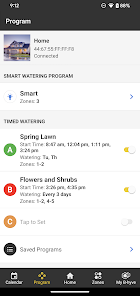
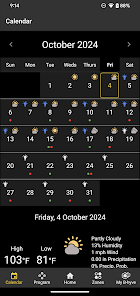
The app provides customizable watering schedules that can be tailored to individual plant needs and seasonal changes. Users can easily set specific days and times for irrigation, ensuring that their gardens receive the right amount of water without any hassle.

Easy Integration

B-hyve easily integrates with existing smart home systems, allowing users to control their irrigation alongside other smart devices. This seamless connectivity enhances convenience, making it simple to manage your garden's needs with just a few taps on your smartphone.

Real-Time Notifications

With real-time notifications, B-hyve keeps users informed about their irrigation system's performance. Alerts for system issues, scheduled watering times, and even weather conditions help users stay on top of their garden care, enhancing the overall gardening experience.

Smart Irrigation Control

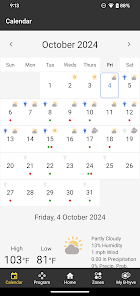
B-hyve offers advanced smart irrigation control, allowing users to manage their watering schedules from anywhere using their smartphone. With weather data integration, the system adjusts watering times automatically to conserve water and ensure optimal plant health, making it a great choice for eco-conscious gardeners.

Pros & Cons

Pros
  • Smart watering schedules save water and money
  • User-friendly app for convenient control anywhere
  • Weather forecasting adjusts schedules automatically
  • Customizable settings for diverse plant needs
  • Remote monitoring ensures optimal irrigation efficiency
Cons
  • Limited compatibility with older irrigation systems
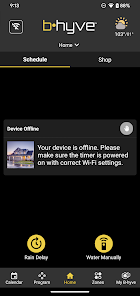
  • Connection issues in low Wi-Fi areas
  • App interface can be confusing for users
  • Higher cost compared to basic timers

Real Experience Using B-hyve

Application Scenarios

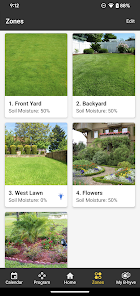
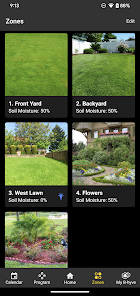
The B-hyve app is primarily designed for smart irrigation management, making it an ideal choice for homeowners, landscapers, and gardening enthusiasts. It seamlessly connects with B-hyve smart irrigation controllers, allowing users to manage their watering schedules from anywhere. Ideal scenarios include managing irrigation systems for residential lawns, community gardens, or even commercial landscaping projects. Users can set up schedules based on weather conditions, ensuring that their plants receive the optimal amount of water without any waste. The app's ability to monitor and control multiple zones makes it especially useful for properties with diverse landscaping needs.

User Experience

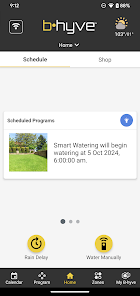
Navigating the B-hyve app is a breeze, thanks to its user-friendly interface. Upon opening the app, users are greeted with a clean dashboard that displays their irrigation system’s status, upcoming schedules, and any alerts. The setup process is straightforward, with guided prompts that help users connect their controllers and set up watering zones efficiently. One standout feature is the weather-based watering adjustments, which automatically modify schedules based on real-time weather data, ensuring that plants receive the right amount of water. Users have reported that notifications about system status and maintenance reminders are particularly helpful, allowing them to stay informed without constant monitoring. Overall, the app enhances the gardening experience, making it less of a chore and more of a pleasure.

Pricing

B-hyve offers a competitive pricing structure, providing value for both casual users and serious gardeners. The app itself is free to download, but users will need to invest in the B-hyve smart irrigation controllers for full functionality. These controllers vary in price based on their features and capabilities, making it accessible for different budgets. Additionally, B-hyve offers various subscription options for advanced features, such as premium weather data and additional zone management, catering to users looking for enhanced control over their irrigation systems. Overall, the pricing strategy aligns well with the benefits it provides, especially for those keen on efficient water management.

Updates & Support

B-hyve is committed to continuous improvement, frequently rolling out updates that enhance user experience and introduce new features. Users can expect regular enhancements focused on performance, usability, and integration with smart home systems. The support system is robust, with a dedicated customer service team available through various channels, including email and chat support. Additionally, the app features a comprehensive FAQ section and user guides, helping users troubleshoot common issues independently. This level of support ensures that users can maximize their experience with the app, reinforcing B-hyve's reputation as a reliable tool for smart irrigation management.

verified Security & Privacy Review

The B-hyve app takes user security and privacy seriously, implementing various measures to protect personal data. The app uses encryption protocols to secure data transmission between the device and its servers, ensuring that sensitive information is not exposed during communication. In terms of permissions, B-hyve requests access to location services, which is necessary for optimizing irrigation settings based on geographic conditions. Users are informed about the data collected and its purpose, promoting transparency. The app also allows users to manage their permissions easily, enabling them to control what information is shared. B-hyve adheres to industry standards for data handling and storage, minimizing the risk of unauthorized access. User data is anonymized where possible, and the app does not sell personal information to third parties, aligning with best privacy practices. Regular updates are provided to address any potential vulnerabilities, further enhancing security. Overall, B-hyve demonstrates a commitment to safeguarding user privacy while providing valuable irrigation management tools.

User Reviews

  • Dusty Boots
    2024/08/28

    The timer itself seems to work okay but my experience with the app has been negative. The device loses bluetooth connection with my phone once I go inside. This is probably why the company designed an addtional piece of equipment, called the Hub, to boost connection. you can purchase this for $30. It's the typical business model of today. Design a product with limited capabilities then up-charge for add ons. Man, consumers are stupid. Uninstalled app.

  • chris murdock
    2025/02/21

    I've had nothing but problems with this device for the last few months. I have two xr 8 zone timers, which both lost connection to the network recently. after trying over and over again I finally got them reconnected which only failed 2 weeks later. I can connect to Bluetooth every time. I have to do a power Cycle to get him to wake back up. what's interesting is one of them is flashing an error code saying it can't connect to the network yet the app says it's connected to the network.

  • Carson Blocker
    2025/09/08

    Pretty good auto watering system. Could use a better way to see a chart of the watering setup on multiple devices. My main gripe is that any rechargeable batteries are automatically flagged for low battery when they are fully charged. This could be added to future a software updates, so no excuse for not improving it.

  • Jon Elias
    2026/06/18

    Really unimpressed with this program. The app UI is fine, but it doesn't connect well with the timers. It also fails to notify me when it doesn't water on schedule. I lost plants as a result when I left for a trip and only discovered upon return none of my zones were watered. no notice from the app, and I still can't figure out why the schedule decided not to run. tech support has been unhelpful as well. Unimpressed and looking for another remote watering solution.

  • Randy Sellet
    2026/06/24

    Too bad the Hub disconnects from wifi after the first week of working well! Now I'm a 10 hr round trip drive away from the home I was watering, so I can't be there to push the button 5 times to get it recomnected!! This is a serious problem for remote users, but if you live at the location you're watering, then the Bluetooth works fine. I don't recommend for remote use by wifi and internet, because the Hub will disconnect sooner or later!

Review Source: Google Play store public user reviews.

FAQ

1

Does B-hyve collect my personal data?

B-hyve may collect personal data to enhance user experience and improve services, but it typically adheres to privacy regulations and provides options for users to manage their data.

2

Does B-hyve offer a free trial or free version?

B-hyve has a free version that allows basic functionality, and they may also provide limited-time free trials for premium features.

3

Does B-hyve require an internet connection?

Yes, B-hyve requires an internet connection to enable remote control and monitoring of your irrigation system through the app.

4

How can I contact support or send feedback for B-hyve?

You can contact B-hyve support through the app, their official website, or by reaching out via email, where you can also submit feedback or report issues.

5

How do I manage or cancel my B-hyve subscription?

You can manage or cancel your B-hyve subscription through the app's settings or account management section, where you'll find options for subscription changes.

How to use B-hyve

1

Can I activate my account using the mobile app?

Yes, you can activate your account through the B-hyve mobile app by following the prompts after downloading it.

2

How can I contact customer service for B-hyve?

You can reach B-hyve customer service by visiting our website and using the contact form or calling the support number listed.

3

How do I activate my B-hyve account after purchase?

To activate your account, follow the instructions in the email you received after purchase, or visit the activation page on our website.

4

How do I log in to my B-hyve account?

To log in, go to the B-hyve website, click on the login button, and enter your email and password.

5

How do I update my customer number if I changed my email?

If you've changed your email, please contact customer service for assistance with updating your customer number.

What's New

Bug fixes and performance optimizations.

Editor's Choice