This site uses cookies to enhance your user experience. By clicking any link on this site you are giving your consent to our cookie policy. Read more
Reject
Accept All

Advertiser and Editorial Disclosures

ArriveCAN

ArriveCAN

verified

CBSA-ASFC

4.8
Rating
5,000,000+ Downloads
3.6.11 Version
  • category

    Category: Travel & Local

  • price

    Price: free

  • age rating

    Age Rating: Everyone

  • rating

    Rating: 4.8

  • available on

    Available on: /

  • updated on

    Updated on: Mar 18, 2026

Screenshot 1
Screenshot 2
Screenshot 3
Screenshot 4
Screenshot 5
Screenshot 6
Screenshot 7
Screenshot 8

Features & Highlights

Digital Health Declaration

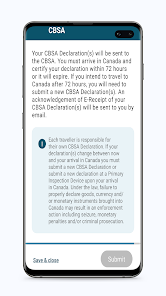
ArriveCAN streamlines the process of submitting your health information before entering Canada. This feature allows travelers to complete their health declarations digitally, reducing wait times at the border and ensuring compliance with public health guidelines, making your journey smoother and more efficient.

Real-Time Updates

Stay informed with real-time updates from the Canadian government regarding travel restrictions and health guidelines. ArriveCAN provides users with timely notifications about any changes to policies, ensuring travelers are always prepared and can adapt their plans accordingly.

Travel History Tracking

With ArriveCAN, users can easily keep track of their travel history, which is essential for fulfilling entry requirements into Canada. This feature allows travelers to view and manage their past trips, ensuring all necessary information is readily available for customs and border protection inquiries.

User-Friendly Interface

The app boasts a user-friendly interface designed for a seamless experience. With intuitive navigation and clear instructions, ArriveCAN makes it easy for anyone to submit their information, even if they're not tech-savvy, ensuring that all travelers can access essential features without hassle.

Pros & Cons

Pros
  • Streamlines the border entry process for travelers
  • Ensures compliance with health regulations and guidelines
  • Reduces wait times at airports and border crossings
  • Enhances safety by tracking COVID-19 exposure risks
  • Provides real-time updates on travel requirements
Cons
  • Complicated for users unfamiliar with technology
  • Requires internet access, limiting some travelers
  • Privacy concerns over personal data collection
  • Frequent updates can confuse users about requirements

Real Experience Using ArriveCAN

Application Scenarios

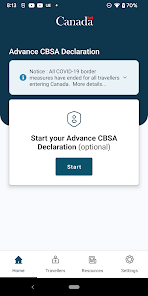
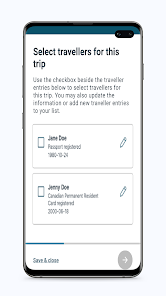
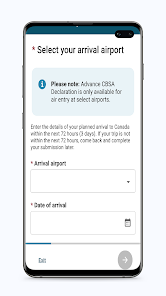
The ArriveCAN app is an essential tool for travelers entering Canada, particularly during the ongoing pandemic. It is designed to streamline the process of providing mandatory travel information to Canadian authorities. Users can input their vaccination status, quarantine plans, and health details prior to arrival, which is crucial for compliance with government regulations. The app is especially useful for international travelers, including tourists, business professionals, and returning residents. Additionally, it can be used for various travel purposes, such as work-related trips, family visits, or educational exchanges. By utilizing ArriveCAN, users can avoid long queues at border crossings, minimize wait times, and ensure a smoother immigration process.

User Experience

The user experience of ArriveCAN is generally positive, with most users appreciating its intuitive interface and straightforward navigation. The app guides users step-by-step through the information submission process, making it accessible even for those who may not be tech-savvy. The registration and entry processes are quick, often taking only a few minutes to complete. Users have reported that the app provides timely notifications and reminders about upcoming travel requirements, which adds an extra layer of convenience. However, some users have encountered issues with app crashes or glitches, particularly during peak travel seasons, which can be frustrating. Overall, the majority find ArriveCAN helpful, especially given the necessity of adhering to health protocols during travel.

Pricing

One of the most appealing aspects of the ArriveCAN app is that it is free to download and use. There are no hidden fees or premium features that require payment, making it an accessible tool for all travelers. The app is available on both iOS and Android platforms, ensuring that a broad audience can utilize its services without financial barriers. This free status is particularly beneficial for frequent travelers, as it allows them to stay informed about travel regulations without incurring additional costs.

Updates & Support

The developers of ArriveCAN are committed to keeping the app updated with the latest information regarding travel restrictions and health guidelines. Users can expect regular updates that improve functionality and address any bugs. Support is also readily available through the app’s help section, which provides answers to frequently asked questions and troubleshooting tips. Additionally, users can reach out to customer support via email or through the official website for more complex inquiries. The proactive approach to updates and customer care reflects the developers’ dedication to enhancing user experience and ensuring compliance with evolving travel regulations.

verified Security & Privacy Review

The ArriveCAN app prioritizes user security and privacy, implementing robust measures to safeguard personal information. The app employs end-to-end encryption to protect user data during transmission, ensuring that sensitive details remain confidential. Additionally, ArriveCAN adheres to strict data retention policies, collecting only the information necessary for its intended purpose, such as travel documentation and health declarations. Users are informed about the types of data collected, which includes contact information and travel details. The app requires permissions that are relevant to its functionality, such as location services for real-time updates. Importantly, user consent is sought before collecting any personal information, and users can delete their data upon completing their travel requirements. ArriveCAN commits to transparency, regularly updating its privacy policy to reflect current practices and legal obligations. Overall, the app demonstrates a strong commitment to protecting user privacy while facilitating safe travel experiences, making it a reliable tool for travelers in Canada.

User Reviews

  • Hardin H Hawes
    2026/04/08

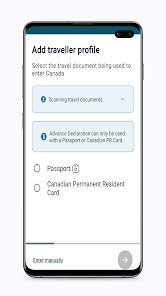
    known to not work for many people - does not receive regular updates. Has well-documented bugs. Other users have reported getting stuck at exactly 12% during the passport scan step. The fix that's worked for some people: uninstall the app completely and reinstall it — did not work. Worth noting: ArriveCAN is no longer mandatory — it's optional but recommended to speed up the customs process.

  • Nick Young
    2025/05/15

    Your passport scanner isn't great. I can't get the photo and bottom bar of numbers to align well enough for it to do it's automated scan. Maybe it's my phone camera but it's like they are too spaced out. Maybe allow the person to take a picture and that gets vetted by your system. Loads of other apps have that ability. I know Japan does. If the dev team behind this app even cares as there is a manual entry option.

  • Sherwin O
    2026/05/30

    A great app to declare customers before arriving. But it as a little slow to upload my passport and I had to restart the app to use it. I manually inputted my documents and which was easier. Also checking information out of the app, restarted my application back again, but my information was saved. Overall a great app instead of just writing on paper as you arrive.

  • Sally M McEachen
    2026/04/16

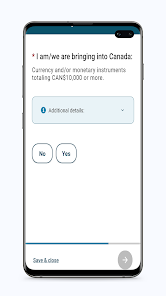
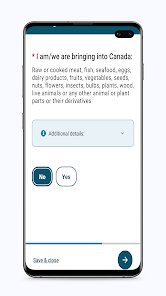
    When you have a work visa and live in Canada and are arriving home in Canada, you are still asked how many days you will be there. This is an impossible question to answer accurately. And you have to check and submit every single goods category in a separate screen, although at the airport screen you can check "no to all". So the app is less convenient.

  • Biggus D
    2025/12/07

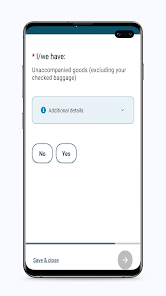
    Most of us will say no to most of the general questions (goods, farms, etc) - the app should, as most apps do, flick to the next question rather than having endless clicking of the "No"/"Submit" buttons. ESPECIALLY when the two buttons are well separated on the screen. Just a thought to make it more user-friendly, to increase accuracy and to improve uptake.

Review Source: Google Play store public user reviews.

FAQ

1

Does ArriveCAN collect my personal data?

ArriveCAN collects personal information necessary for processing travel and health information, but it adheres to strict privacy standards and regulations to protect users' data.

2

Does ArriveCAN offer a free trial or free version?

ArriveCAN is a free app and does not have a paid subscription model, so all features are available to users at no cost.

3

Does ArriveCAN require an internet connection?

Yes, ArriveCAN requires an internet connection to submit information and receive updates; however, users can complete parts of the app offline and sync data once they are online.

4

How can I contact support or send feedback for ArriveCAN?

Users can contact ArriveCAN support or provide feedback through the app directly or visit the official ArriveCAN website for additional resources and contact information.

5

How do I manage or cancel my ArriveCAN subscription?

Since ArriveCAN does not have a subscription model, there is no need to manage or cancel a subscription; users can simply download and use the app freely.

How to use ArriveCAN

1

How do I activate my ArriveCAN account?

Download the app, create an account by entering your details, and follow the verification steps sent to your email.

2

How do I contact Customer Service for the ArriveCAN app?

You can reach Customer Service via the support section in the app or visit the official website for contact information.

3

How do I find the Customer Number for ArriveCAN?

Your Customer Number can typically be found in the app or in the confirmation emails related to your travel.

4

How do I log in to the ArriveCAN app?

Open the app and enter your email and password. If you don’t have an account, you can create one by following the prompts.

What's New

- Updated dependencies

Editor's Choice