This site uses cookies to enhance your user experience. By clicking any link on this site you are giving your consent to our cookie policy. Read more
Reject
Accept All

Advertiser and Editorial Disclosures

ANZ Plus

ANZ Plus

verified Verified App

Developer: Australia and New Zealand Banking Group Limited

  • category

    Category: Finance

  • price

    Price: Share

  • age rating

    Age Rating: Everyone

  • rating

    Rating:

  • download

    Downloads: 1,000,000+

  • version

    Version: 1.0 (72468)

Screenshot 1
Screenshot 2
Screenshot 3
Screenshot 4
Screenshot 5
Screenshot 6
Screenshot 7
Screenshot 8

Features & Highlights

Instant Notifications

Stay informed with instant notifications for transactions, payments, and account updates. ANZ Plus ensures you're always in the loop, allowing you to react quickly to unauthorized transactions or budget adjustments, giving you peace of mind and greater control over your finances.

Personalized Insights

The app provides personalized insights based on your spending habits, helping you make informed decisions about your finances. By analyzing your transactions, ANZ Plus delivers tailored advice and tips to improve your money management, making your financial journey smoother and more efficient.

Seamless Payments Experience

With ANZ Plus, making payments is a breeze thanks to its user-friendly interface and quick payment options. Whether you're sending money to friends or paying bills, the app streamlines the payment process, making it fast and hassle-free while ensuring security is never compromised.

Smart Budgeting Tools

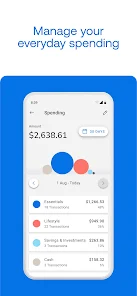
ANZ Plus offers intuitive budgeting tools that allow users to effortlessly track their spending and manage their finances. With real-time insights and customizable categories, you can easily set budgets and monitor your financial goals, helping you stay on top of your financial wellbeing.

Pros & Cons

Pros
  • ANZ Plus offers a user-friendly mobile banking experience.
  • Enjoy zero monthly account fees for easy savings.
  • Access personalized financial insights and budgeting tools.
  • Seamlessly manage multiple accounts in one app.
  • Benefit from round-the-clock customer support whenever you need it.
Cons
  • Limited customer service options can lead to longer wait times for assistance.
  • High fees on certain transactions may reduce overall account benefits.
  • Lack of physical branches can hinder access to in-person support and services.

Real Experience Using ANZ Plus

Application Scenarios

ANZ Plus is designed for individuals seeking a modern banking experience that seamlessly integrates with their daily financial needs. Whether you are managing your personal finances, saving for a specific goal, or looking for a comprehensive banking solution, ANZ Plus caters to various scenarios. Users can easily track their spending habits, set budgets, and receive personalized insights to make informed financial decisions. The app is particularly beneficial for younger users and tech-savvy individuals who prefer managing their finances on-the-go, as it provides a user-friendly interface and quick access to essential banking features. Additionally, the app supports a range of transactions, including bill payments and fund transfers, making it a versatile tool for everyday banking tasks.

User Experience

The user experience of ANZ Plus is commendable, with its intuitive design and smooth navigation. Upon logging in, users are greeted with a clean dashboard that displays their account balances and recent transactions at a glance. The app's features are well-organized, allowing users to access budgeting tools, savings goals, and transaction history without any hassle. Notifications and alerts are also easily customizable, helping users stay on top of their financial activities. One standout feature is the ability to categorize spending, which enables users to visualize their financial habits and make adjustments as needed. However, some users have reported occasional glitches or slow loading times during peak hours, which could hinder the overall experience. Overall, ANZ Plus successfully combines functionality with a pleasant user interface, making banking more accessible than ever.

Pricing

ANZ Plus operates with a transparent pricing model that is relatively straightforward for users. The app does not charge monthly account fees for basic transactions, allowing users to manage their finances without incurring additional costs. However, certain premium features may come with associated fees, which are clearly outlined within the app. The pricing structure is designed to be competitive, and users can benefit from various promotional offers and incentives, especially when signing up for new accounts or referrals. This makes ANZ Plus an attractive option for those looking to minimize banking expenses while enjoying a comprehensive suite of financial services.

Updates & Support

ANZ Plus is committed to continuous improvement, as evidenced by regular updates that enhance functionality and user experience. The development team actively listens to user feedback, implementing new features and addressing any reported issues promptly. Users can expect frequent updates that may introduce new tools, improve existing features, or enhance security measures. Customer support is readily available through the app, providing users with access to chat support and extensive FAQs. The responsiveness of the support team is generally well-rated, ensuring that users receive the assistance they need in a timely manner. Overall, ANZ Plus demonstrates a strong commitment to maintaining a reliable and user-friendly banking platform.

verified Security & Privacy Review

The ANZ Plus app prioritizes user security and privacy, incorporating robust measures to protect sensitive information. It utilizes advanced encryption techniques for data transmission and storage, ensuring that personal and financial details remain confidential. The app also employs biometric authentication options, such as fingerprint and facial recognition, providing an additional layer of security for user accounts. Regarding privacy practices, ANZ Plus is transparent about its data collection policies. Users are informed about the types of data collected and how it will be used, allowing for informed consent. The app requests only essential permissions, minimizing access to personal data unless absolutely necessary for functionality. ANZ Plus adheres to strict data handling protocols, ensuring that user information is securely managed and stored. Regular security audits and updates further enhance the app’s defenses against potential threats. Overall, ANZ Plus demonstrates a strong commitment to maintaining user privacy and safeguarding data, making it a trustworthy option for managing finances securely.

Reviews

“User-friendly interface makes banking a breeze”

“Great budgeting tools for financial management”

“Instant notifications keep me updated on transactions”

“Customer support is responsive and helpful”

“Seamless integration with other financial apps”

Compare APP

FAQ

1

Can I submit suggestions or feedback to ANZ Plus?

Yes, users can submit suggestions or feedback directly through the app or contact customer support to share their thoughts and experiences.

2

Does ANZ Plus collect my personal data?

Yes, ANZ Plus collects personal data to provide services and improve the user experience. Users can review the app's privacy policy for more details on data collection and usage.

3

Does ANZ Plus support offline use?

While ANZ Plus requires an internet connection for most functions, some features may be accessible offline, such as viewing previously downloaded transactions.

4

How do I cancel my ANZ Plus subscription?

Users can cancel their ANZ Plus subscription through the app's settings or by contacting customer support for assistance with the cancellation process.

5

How much does a subscription to ANZ Plus cost?

The subscription cost for premium features of ANZ Plus may vary, so it is best to check the app for the most current pricing information.

How to use ANZ Plus

1

Can I activate my account online?

Yes, you can activate your ANZ Plus account online by following the instructions sent to your email after registration.

2

How can I change my Customer Number if needed?

To change your Customer Number, please contact Customer Service for guidance on the process.

3

How can I contact Customer Service for ANZ Plus?

You can reach ANZ Plus Customer Service through the app, website, or by calling our helpline for assistance.

4

How do I find my Customer Number in the app?

Open the ANZ Plus app, go to the settings or profile section, and your Customer Number should be displayed there.

5

How do I log in to my ANZ Plus account?

To log in, open the ANZ Plus app or website, enter your Customer Number and password, then click 'Log In'.

Editor's Choice