This site uses cookies to enhance your user experience. By clicking any link on this site you are giving your consent to our cookie policy. Read more
Reject
Accept All

Advertiser and Editorial Disclosures

Varo Bank: Online Banking

Varo Bank: Online Banking

verified Verified App

Developer: Varo Bank, N.A.

  • category

    Category: Finance

  • price

    Price: free

  • age rating

    Age Rating: Everyone

  • rating

    Rating: 4.6

  • download

    Downloads: 5,000,000+

  • version

    Version: 4.23.1

Screenshot 1
Screenshot 2
Screenshot 3
Screenshot 4
Screenshot 5
Screenshot 6
Screenshot 7
Screenshot 8

Features & Highlights

Easy Money Transfers

Sending and receiving money is a breeze with Varo Bank's intuitive money transfer feature. Whether you're splitting bills with friends or sending funds to family, the seamless process ensures quick transactions without hassle. This capability enhances your banking experience, making it convenient and user-friendly.

High-Interest Savings

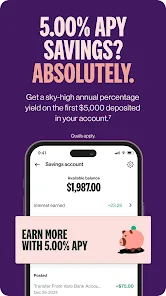
Maximize your savings with Varo Bank's competitive interest rates on savings accounts. You can earn significantly more compared to traditional banks, making it easier for you to achieve your financial goals. This feature encourages you to save money effectively while enjoying the benefits of online banking.

Instant Notifications

Stay on top of your finances with real-time transaction alerts. Varo Bank sends instant notifications for every debit or credit activity, helping you track your spending and manage your budget effectively. This feature ensures you are always informed about your account status, enhancing your financial awareness.

No Monthly Fees

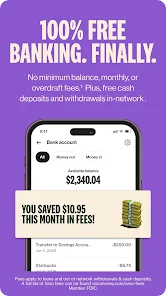
Enjoy banking without the burden of monthly maintenance fees. Varo Bank is committed to providing a fee-free banking experience, allowing you to save more of your hard-earned money. This approach makes banking accessible and straightforward for everyone, without hidden costs.

Pros & Cons

Pros
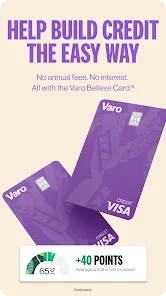
  • No monthly fees, maximizing your savings potential
  • User-friendly app for easy account management anytime
  • High interest rates on savings boost your earnings
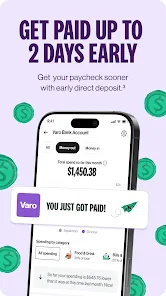
  • Early direct deposit for quicker access to funds
  • 24/7 customer support for personalized assistance when needed
Cons
  • Limited customer support options can lead to frustration during urgent issues.
  • No physical branches may hinder access for those preferring in-person banking.
  • Fee structures can be confusing, potentially leading to unexpected charges.

Real Experience Using Varo Bank: Online Banking

Application Scenarios

Varo Bank is designed to cater to a variety of banking needs, making it an ideal choice for users looking for a fully digital banking experience. Whether you’re managing your day-to-day expenses, saving for a specific goal, or simply wanting a more efficient way to handle your finances, Varo offers a user-friendly platform that meets those demands. The app is particularly beneficial for younger users or those who prefer to manage their money on-the-go, as it provides essential banking features without the need for a physical bank branch. Users can deposit checks, transfer funds, and pay bills directly through the app, making it a versatile solution for both casual spenders and detailed budgeters. Additionally, Varo’s budgeting tools and savings features allow users to track their financial habits and set aside money for future needs seamlessly.

User Experience

The user experience of Varo Bank is one of its standout features. The app boasts a clean, intuitive interface that allows users to navigate effortlessly through its various functionalities. Onboarding is straightforward, requiring minimal time to set up an account and access banking features. The app provides real-time notifications for transactions, helping users stay informed about their account activity. Moreover, Varo’s budgeting tools are integrated into the app, enabling users to categorize their spending and set financial goals with ease. The customer service options are also commendable; users can reach out for support through chat or email, with quick response times. Overall, the app is designed to make banking accessible and straightforward, appealing to both tech-savvy individuals and those new to digital banking.

Pricing

Varo Bank operates with a transparent pricing model that is attractive to many users. The app offers a no-fee banking experience, which means no monthly maintenance fees, no overdraft fees, and no foreign transaction fees, making it a cost-effective choice for budget-conscious individuals. Users can access a high-yield savings account with competitive interest rates, allowing them to grow their savings without incurring additional costs. The app also provides a range of premium features for users willing to pay for enhanced services, but the basic functionalities remain free, ensuring that all users can benefit from the essential banking tools.

Updates & Support

Varo Bank regularly updates its app to enhance user experience and introduce new features. The updates often include improved security measures, bug fixes, and additional functionalities based on user feedback. The support team is responsive and available to assist with any inquiries or issues that may arise, ensuring that users feel supported throughout their banking journey. Varo’s commitment to customer satisfaction is evident through their proactive communication regarding updates and feature enhancements. Users can expect a seamless experience as the app continues to evolve to meet their financial needs.

verified Security & Privacy Review

Varo Bank prioritizes user security and privacy, employing advanced encryption protocols to protect sensitive data during transmission and storage. The app utilizes two-factor authentication (2FA) to add an extra layer of security, ensuring that only authorized users can access their accounts. Varo Bank adheres to strict regulatory standards, including those set by the Federal Deposit Insurance Corporation (FDIC), which helps to safeguard users' funds. In terms of privacy practices, Varo Bank is transparent about its data handling policies. The app collects minimal personal information necessary for account creation and transaction processing. Users have control over their privacy settings and can manage permissions related to location and notifications. Varo’s privacy policy outlines how data is collected, used, and shared, emphasizing a commitment to user confidentiality. Varo does not sell user data to third parties, ensuring that personal information remains secure. Regular updates and security audits help to maintain a robust security framework, giving users confidence in their banking experience.

Reviews

4.6

“Great user interface and easy to navigate!”

“Fast transactions and no hidden fees.”

“Customer service is responsive and helpful.”

“App crashes occasionally, needs improvement.”

“Loving the budgeting tools and insights!”

Compare APP

FAQ

1

Can I submit suggestions or feedback to Varo Bank: Online Banking?

Yes, users can submit suggestions or feedback through the app or by contacting customer support via the website or app.

2

Does Varo Bank: Online Banking collect my personal data?

Yes, Varo Bank collects personal data as part of its account setup and transaction processes, but it is committed to protecting user privacy and data security.

3

Does Varo Bank: Online Banking support offline use?

Varo Bank: Online Banking requires an internet connection to access its services and features, so it does not support offline use.

4

How do I cancel my Varo Bank: Online Banking subscription?

Since Varo Bank does not have a subscription model, users can simply stop using the app, but they must close their accounts through the app or customer service for complete cancellation.

5

How much does a subscription to Varo Bank: Online Banking cost?

There is no subscription fee for using Varo Bank: Online Banking, as it operates without traditional banking fees.

How to use Varo Bank: Online Banking

1

Can I change my customer number?

Your customer number is unique and cannot be changed. If you need assistance, please contact customer service.

2

How can I contact Varo Bank customer service?

You can reach Varo Bank customer service through the app, or by visiting our website for chat and email support.

3

How can I update my customer information?

You can update your customer information by logging into your account and navigating to the profile settings section.

4

How do I activate my Varo Bank account?

To activate your account, simply follow the instructions in the activation email you received after signing up.

5

How do I log in to my Varo Bank account?

You can log in to your Varo Bank account by entering your email and password on the login page of the app or website.

Editor's Choice