This site uses cookies to enhance your user experience. By clicking any link on this site you are giving your consent to our cookie policy. Read more
Reject
Accept All
Quicken Simplifi: Budget Smart

Quicken Simplifi: Budget Smart

verified Verified App

Developer: Quicken Inc.

  • category

    Category: Finance

  • price

    Price: free

  • age rating

    Age Rating: Everyone

  • rating

    Rating: 4.3

  • download

    Downloads: 500,000+

  • version

    Version: /

Screenshot 1
Screenshot 2
Screenshot 3
Screenshot 4
Screenshot 5
Screenshot 6
Screenshot 7
Screenshot 8
Screenshot 9
Screenshot 10
Screenshot 11
Screenshot 12
Screenshot 13
Screenshot 14
Screenshot 15
Screenshot 16
Screenshot 17
Screenshot 18
Screenshot 19
Screenshot 20
Screenshot 21

Features & Highlights

Goal Tracking

Easily set and track financial goals with Quicken Simplifi's goal-oriented features. Whether you're saving for a vacation or paying down debt, the app keeps you motivated by showing your progress towards each goal, making it simpler to reach your desired milestones.

Secure Account Linking

Quicken Simplifi allows for secure linking of your bank accounts and credit cards, ensuring that your financial data is always up to date. This seamless integration not only saves you time but also provides a comprehensive view of your financial standing in one convenient place.

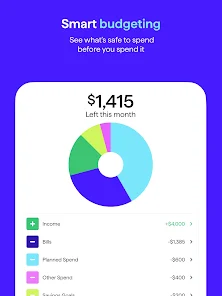
Smart Budgeting

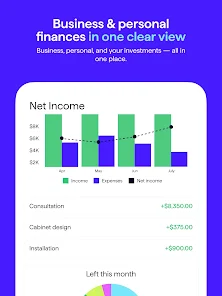
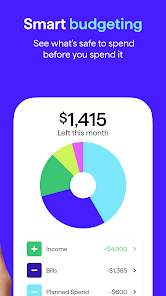
Quicken Simplifi offers intuitive budgeting tools that automatically categorize your spending, helping you set realistic financial goals. With real-time updates, you can see how each transaction affects your budget, making it easier to stay on track and adjust as needed throughout the month.

Spending Insights

Gain valuable insights into your spending habits with Quicken Simplifi's detailed reports and analysis. The app highlights your top spending categories and trends over time, empowering you to make informed decisions about where to cut back or invest more in your financial future.

Pros & Cons

Pros
  • Intuitive interface for easy navigation and use.
  • Customizable budgets tailored to your financial goals.
  • Real-time tracking of expenses for better insights.
  • Automated insights help identify spending patterns.
  • Secure syncing with your bank accounts for accuracy.
Cons
  • Limited customization options for budgeting categories
  • No offline access available for users
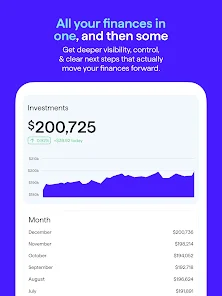
  • Lacks comprehensive investment tracking features
  • Subscription fees can add up over time

Real Experience Using Quicken Simplifi: Budget Smart

Application Scenarios

Quicken Simplifi: Budget Smart is designed for a variety of users who want to take control of their finances. Whether you are a college student managing a tight budget, a working professional tracking monthly expenses, or a family planning for future goals, this app caters to multiple financial scenarios. Users can easily categorize their spending, set up savings goals, and monitor their progress over time. It’s particularly handy for individuals who are looking to consolidate their financial activities into one platform, as it allows for easy integration with bank accounts, credit cards, and loans. This versatility makes it suitable for everyday budgeting, long-term financial planning, and even preparing for significant life events like buying a home or saving for retirement.

User Experience

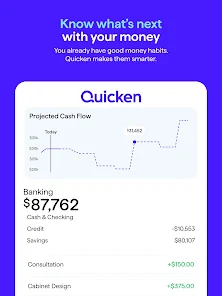
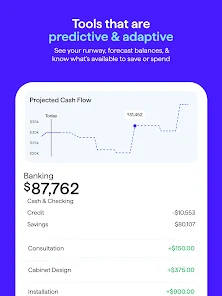
The user experience of Quicken Simplifi is one of its standout features. The interface is clean, intuitive, and user-friendly, making it easy for users of all ages to navigate the app. The onboarding process is seamless, with guided tutorials that help new users set up their accounts and budgets without feeling overwhelmed. Users appreciate the visually appealing dashboards that present financial data in a straightforward manner, allowing them to quickly grasp their spending habits and financial health. Additionally, the app’s real-time syncing ensures that users are always up-to-date with their financial activities, making it easy to adjust budgets as needed. Notifications and alerts also keep users informed about upcoming bills or when they are nearing their budget limits, further enhancing the user experience.

Pricing

Quicken Simplifi offers a subscription-based pricing model, which is competitive for the features it provides. Users can take advantage of a free trial period to explore its functionality before committing to a monthly or annual subscription. The pricing is tiered, allowing users to choose a plan that best fits their financial management needs. This flexibility is appealing, as it accommodates both casual users and those who require more advanced features. While some may find the subscription model a drawback compared to one-time purchase apps, the ongoing updates and customer support included in the pricing structure add significant value.

Updates & Support

Quicken Simplifi is committed to continuous improvement, with regular updates that enhance functionality and address user feedback. The development team actively listens to user suggestions, ensuring that the app evolves to meet the changing needs of its user base. Customer support is readily available through multiple channels, including email and an extensive online help center that features FAQs, tutorials, and troubleshooting guides. Users have reported positive experiences with the support team, noting prompt responses and helpful solutions to issues. This dedication to customer satisfaction contributes to a sense of trust and reliability for users navigating their financial journeys.

verified Security & Privacy Review

Quicken Simplifi: Budget Smart prioritizes user security and privacy, implementing robust measures to protect sensitive financial information. The app uses advanced encryption protocols to safeguard data both in transit and at rest, ensuring that personal and financial details remain confidential. Additionally, multi-factor authentication is available, adding an extra layer of security for user accounts. In terms of privacy practices, Quicken Simplifi adheres to strict data handling policies. The app does not sell user data to third parties, and it minimizes data collection to what is necessary for providing its services. Users have control over their data, with clear options to manage permissions and delete information when desired. The app requests essential permissions, such as access to bank accounts, but clearly outlines the purpose of each request, ensuring transparency. This commitment to security and privacy helps build trust, allowing users to manage their budgets confidently while knowing their information is protected.

Reviews

4.3

“User-friendly interface makes budgeting a breeze”

“Great for tracking expenses in real-time”

“Love the automatic syncing with my bank accounts”

“Helpful insights for smarter financial decisions”

“Customizable categories enhance my budgeting experience”

Editor's Choice