This site uses cookies to enhance your user experience. By clicking any link on this site you are giving your consent to our cookie policy. Read more
Reject
Accept All

Advertiser and Editorial Disclosures

KOHO: Canada's Money App

KOHO: Canada's Money App

verified Verified App

Developer: KOHO Financial

  • category

    Category: Finance

  • price

    Price: Share

  • age rating

    Age Rating: Everyone

  • rating

    Rating: 4.7

  • download

    Downloads: 1,000,000+

  • version

    Version: 3.14.0

Screenshot 1
Screenshot 2
Screenshot 3
Screenshot 4
Screenshot 5
Screenshot 6

Features & Highlights

Budgeting Tools

KOHO makes budgeting a breeze with customizable categories and spending limits. You can easily set goals for your finances, monitor your progress, and adjust as needed, ensuring that you stay within your budget while still enjoying life.

Instant Notifications

Stay on top of your spending with real-time notifications. KOHO sends you alerts for every transaction, helping you track your expenses as they happen, so you can make informed financial decisions without the guesswork.

No Hidden Fees

Enjoy a transparent banking experience with KOHO's commitment to no hidden fees. Unlike traditional banks, KOHO provides a straightforward approach to managing your money, so you can focus on what really matters—growing your savings and achieving your financial goals.

Savings Goals

With KOHO, you can create specific savings goals that motivate you to save more effectively. Whether it's for a dream vacation or a new gadget, the app helps you visualize your progress and encourages smart saving habits, making your financial aspirations more attainable.

Pros & Cons

Pros
  • Manage your finances effortlessly with real-time spending notifications.
  • Enjoy seamless budgeting tools that help track your expenses.
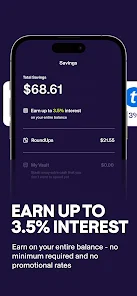
  • Access a high-interest savings account to grow your money faster.
  • Use the prepaid Visa card for secure and easy purchases everywhere.
  • Benefit from no hidden fees, ensuring transparency in your spending.
Cons
  • Limited customer service options can lead to frustrating experiences.
  • Monthly fees can add up for some users.
  • No physical bank branches may inconvenience those needing in-person support.

Real Experience Using KOHO: Canada's Money App

Application Scenarios

KOHO: Canada's Money App is designed to cater to a wide array of financial needs for Canadians. Whether you are a student managing a tight budget, a young professional striving to save for future goals, or a family looking to keep track of expenses, KOHO provides a user-friendly platform to help you achieve your financial objectives. The app is particularly useful for everyday transactions, allowing users to make purchases seamlessly using their KOHO prepaid card. Additionally, the app's budgeting tools allow you to set financial goals and track your spending in real-time, making it ideal for those who want to take control of their finances. Users can also use KOHO to manage their savings by setting aside money for specific purposes, like vacations or emergency funds, making it a versatile tool for any financial scenario.

User Experience

The user experience of KOHO is one of its standout features. The app is intuitively designed, making navigation simple and straightforward. Users can easily access their account information, view transactions, and analyze spending patterns. The sleek interface is complemented by colorful graphs and charts that visualize financial data, making it engaging and informative. Notifications about spending habits and budget limits are timely and helpful, ensuring that users remain aware of their financial health. Additionally, KOHO’s customer service is commendable, with responsive support available through chat features. The app also includes educational resources like articles and tips on personal finance, enhancing the overall user experience and empowering users to make informed financial decisions.

Pricing

KOHO’s pricing structure is competitive and user-friendly. The app offers a free plan that provides essential features, such as unlimited transactions and basic spending insights. For users seeking more advanced tools, KOHO Premium is available at a monthly fee, which includes perks like higher interest rates on savings, personalized financial insights, and access to additional budgeting features. This tier allows users to maximize their financial management capabilities while still being affordable. Overall, KOHO’s pricing is designed to cater to a broad audience, ensuring that financial management tools are accessible to everyone, regardless of income level.

Updates & Support

KOHO continuously improves its platform through regular updates that enhance functionality and user experience. Each update typically addresses user feedback, introducing new features that keep the app relevant in a rapidly evolving financial landscape. The support team is proactive in resolving issues, and users can easily access help through the in-app chat or via email. KOHO also maintains an active online community where users can share tips and experiences, fostering a sense of belonging and support. Overall, KOHO's commitment to updates and customer support solidifies its standing as a reliable financial management tool.

verified Security & Privacy Review

KOHO: Canada's Money App prioritizes user security and privacy, implementing robust measures to protect sensitive financial information. The app utilizes bank-level encryption protocols to safeguard data during transmission and storage, ensuring that personal and financial details remain confidential. In terms of privacy practices, KOHO adheres to strict compliance with Canadian privacy laws, providing users with transparency regarding data collection and usage. The app only collects essential information needed to deliver its services, and users are informed about what data is being used and for what purposes. Permissions requested by the app are minimal and directly related to its functionality, such as accessing location for transaction tracking. Users have control over their data, with the option to delete their accounts and associated information whenever desired. Overall, KOHO demonstrates a commitment to protecting user data and privacy, making it a reliable choice for Canadians seeking to manage their finances securely.

Reviews

4.7

“Great budgeting features, love the instant transactions!”

“Customer support is responsive and helpful.”

“User-friendly interface makes managing money easy.”

“Cashback rewards are a nice bonus.”

“I appreciate the savings goals feature!”

Compare APP

FAQ

1

Can I submit suggestions or feedback to KOHO: Canada's Money App?

Yes, users can submit suggestions or feedback through the app or by contacting KOHO's customer support team.

2

Does KOHO: Canada's Money App collect my personal data?

Yes, KOHO collects personal data to provide its services, but it follows strict privacy policies to protect user information.

3

Does KOHO: Canada's Money App support offline use?

KOHO requires an internet connection for most features, but some basic functionalities may be available offline.

4

How do I cancel my KOHO: Canada's Money App subscription?

You can cancel your subscription directly through the app settings or by contacting KOHO customer support for assistance.

5

How much does a subscription to KOHO: Canada's Money App cost?

The subscription cost for KOHO varies depending on the plan chosen, with options typically ranging from a low monthly fee for premium features.

How to use KOHO: Canada's Money App

1

Can I log in to my account with my phone number?

Currently, you need to log in using your email and password. If you have trouble, reach out to customer service for support.

2

How can I activate my KOHO account?

To activate your account, click the activation link in your welcome email and follow the prompts to complete the setup.

3

How can I contact customer service if I have issues with my account?

You can reach our customer service through the app's support section or by emailing support

4

How do I log in to my KOHO account?

Simply open the app and enter your email and password. If you have trouble, use the "Forgot Password" option for help.

5

How do I update my customer information?

You can update your customer information directly in the app under the settings menu or by contacting customer service for further assistance.

Editor's Choice