This site uses cookies to enhance your user experience. By clicking any link on this site you are giving your consent to our cookie policy. Read more
Reject
Accept All
Arvest Go Mobile Banking

Arvest Go Mobile Banking

verified Verified App

Developer: Arvest Bank

  • category

    Category: Finance

  • price

    Price: free

  • age rating

    Age Rating: Everyone

  • rating

    Rating: 3.6

  • download

    Downloads: 500,000+

  • version

    Version: 1.29.0

Screenshot 1
Screenshot 2
Screenshot 3
Screenshot 4
Screenshot 5
Screenshot 6

Features & Highlights

Account Management

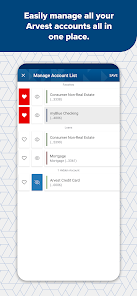
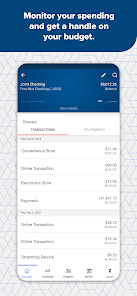
Stay on top of your finances with comprehensive account management tools. You can view balances, transaction histories, and even categorize your spending, all from the palm of your hand, helping you make informed financial decisions anytime, anywhere.

Bill Pay Feature

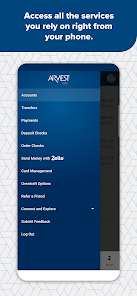
Take the hassle out of paying bills by using the built-in bill pay feature. Schedule payments, set up recurring bills, and receive reminders, ensuring you never miss a due date while keeping your finances organized and stress-free.

Mobile Check Deposit

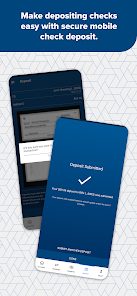
Easily deposit checks from the comfort of your home using the mobile check deposit feature. Simply snap a photo of your check, and the app will guide you through the submission process, making banking more convenient than ever without the need to visit a branch.

Secure Messaging

Communicate directly and securely with customer support through the secure messaging feature. Whether you have questions or need assistance, you can reach out without worrying about your information being compromised, ensuring a safe banking experience.

Pros & Cons

Pros
  • Convenient access to your accounts anytime, anywhere
  • Instant transaction alerts keep you informed
  • Easily deposit checks using your smartphone camera
  • User-friendly interface for seamless navigation
  • Secure banking with advanced encryption technology
Cons
  • Limited functionality compared to desktop version
  • Occasional app crashes and bugs
  • Poor customer support response times
  • Limited compatibility with older devices

Real Experience Using Arvest Go Mobile Banking

Application Scenarios

The Arvest Go Mobile Banking app is designed to meet the needs of a variety of users, making it an essential tool for both personal and business banking. Users can utilize the app for everyday transactions, such as checking account balances, transferring funds, and paying bills. The app's mobile deposit feature allows users to take photos of checks and deposit them directly into their accounts, providing convenience for those who are often on the go. Additionally, the app is particularly beneficial for small business owners who need to manage cash flow, track expenses, and access their accounts from anywhere. Overall, the Arvest Go app is well-suited for anyone looking to streamline their banking experience and maintain financial oversight at their fingertips.

User Experience

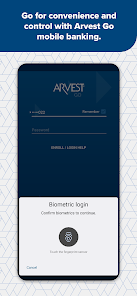
Users generally report a positive experience with the Arvest Go Mobile Banking app due to its user-friendly interface and seamless navigation. The app is visually appealing, with a clean layout that makes it easy to find necessary features. Users appreciate the customizable dashboard that allows them to prioritize the most frequently used functions. The app's performance is typically smooth, with quick loading times and minimal glitches, enhancing the overall user experience. Furthermore, the secure login options, including biometric authentication, provide peace of mind for users concerned about their financial information. Customer feedback highlights the app's reliability and the convenience it brings in managing daily banking tasks without the need to visit a physical branch.

Pricing

The Arvest Go Mobile Banking app is available for free to all Arvest Bank account holders. There are no hidden fees associated with downloading or using the app, making it an accessible option for anyone with an account at the bank. While some premium banking features may incur fees, the basic functionalities provided through the app, such as balance checks, fund transfers, and bill payments, are offered at no additional cost. This transparency in pricing is appreciated by users, as it allows them to budget their banking needs without any unexpected charges.

Updates & Support

The Arvest Go app is regularly updated to enhance its functionality and security. Users can expect periodic releases that introduce new features, improve performance, and address any bugs reported by users. The support provided by Arvest Bank is also commendable, with a dedicated customer service team available to assist users with any issues or inquiries related to the app. Users can access help through the app itself or via the bank’s website, ensuring they have the resources needed to resolve any challenges they may encounter. Overall, the commitment to updates and support makes the Arvest Go Mobile Banking app a reliable choice for managing one’s finances in a digital landscape.

verified Security & Privacy Review

The Arvest Go Mobile Banking app prioritizes user security and privacy, employing robust encryption protocols to safeguard sensitive information during transmission. The app utilizes advanced security measures, including biometric authentication options such as fingerprint and facial recognition, ensuring that only authorized users can access their accounts. In terms of permissions, the app requests access to essential device features like location services for branch and ATM locator functionalities. Users are informed about the necessity of these permissions, allowing for a transparent experience. Additionally, the app adheres to strict data handling practices, collecting only the information required to provide banking services while maintaining user confidentiality. Arvest Bank follows industry standards and regulatory compliance, including the use of secure servers and regular security audits to protect user data from unauthorized access. Overall, the Arvest Go Mobile Banking app demonstrates a strong commitment to maintaining the privacy and security of its users, fostering trust and confidence in its digital banking services.

Reviews

3.6

“User-friendly interface makes banking easy and efficient.”

“Great features for tracking expenses and managing finances.”

“Quick and reliable app performance without crashes.”

“Excellent customer service through the app.”

“Mobile deposits are fast and hassle-free.”

Editor's Choice