This site uses cookies to enhance your user experience. By clicking any link on this site you are giving your consent to our cookie policy. Read more
Reject
Accept All

Advertiser and Editorial Disclosures

WICShopper

WICShopper

verified Verified App

Developer: JPMA, Inc

  • category

    Category: Shopping

  • price

    Price: free

  • age rating

    Age Rating: Everyone

  • rating

    Rating: 4.8

  • download

    Downloads: 1,000,000+

  • version

    Version: 5.2.25

Screenshot 1
Screenshot 2
Screenshot 3
Screenshot 4
Screenshot 5
Screenshot 6
Screenshot 7

Features & Highlights

Product Search Tool

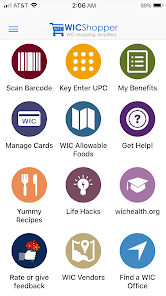
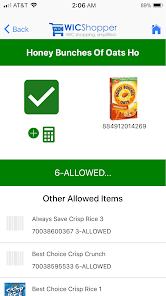
WICShopper includes a comprehensive product search tool that helps you find WIC-approved items at your local stores. Whether you're looking for specific brands or general food categories, this feature ensures you stay within the guidelines while shopping.

Shopping List Feature

Create and manage your shopping list directly within the app, making it easier to keep track of what you need. You can add WIC-approved items and check them off as you shop, ensuring you never forget essential products during your grocery run.

Store Locator

Find nearby stores that accept WIC benefits using the built-in store locator. This feature helps you identify convenient shopping locations, ensuring you have access to WIC-approved products without the hassle of searching multiple stores.

WIC Eligibility Checker

Easily determine your eligibility for WIC benefits with the WICShopper app. This feature allows you to input basic information and get instant feedback, making it simpler to navigate the WIC program and understand your options for assistance.

Pros & Cons

Pros
  • Access to real-time WIC eligibility information
  • Easily find WIC-approved foods and brands
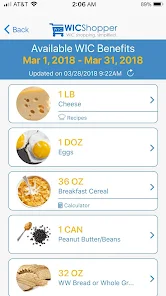
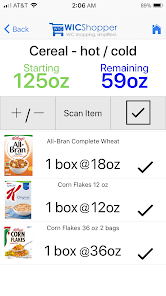
  • Track your benefits and balances effortlessly
  • Receive personalized shopping lists for convenience
  • Stay updated with local WIC program resources
Cons
  • Limited product availability information in stores.
  • User interface can be confusing for some.
  • Frequent app crashes or slow performance issues.
  • Requires internet access to function effectively.

Real Experience Using WICShopper

Application Scenarios

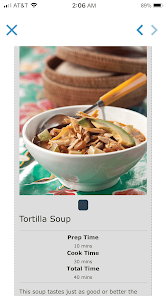
The WICShopper app is designed primarily for participants in the Women, Infants, and Children (WIC) program, providing a seamless experience for managing benefits. Whether you are a new mother navigating your WIC benefits for the first time or a seasoned participant, the app serves a variety of scenarios. Users can easily check their eligibility for items, locate nearby stores that accept WIC benefits, and browse a comprehensive list of approved products. This is especially helpful during grocery shopping, as it eliminates the uncertainty of whether a product qualifies. Additionally, the app can be a valuable tool for families looking to plan meals according to WIC guidelines, ensuring that they can make the most of their benefits while maintaining a nutritious diet.

User Experience

WICShopper delivers an intuitive user interface that is easy to navigate, even for those who may not be tech-savvy. The app’s clean design allows users to quickly access essential features, such as scanning barcodes to determine if products are WIC-approved. The shopping list feature is another highlight, enabling users to create and manage lists based on their needs. Notifications about eligible items and updates on benefits are also well-integrated, keeping users informed without being overwhelming. However, some users have reported occasional glitches, particularly with the barcode scanner, which can lead to frustrations during shopping trips. Overall, the app enhances the grocery shopping experience for WIC participants and their families.

Pricing

WICShopper is completely free to download and use, which is a significant advantage for low-income families who benefit from WIC services. As the app aims to support users in making the most of their WIC benefits, there are no hidden fees or in-app purchases to worry about. This accessibility ensures that anyone eligible for WIC can utilize the app without any additional financial burden, making it a valuable resource for managing food assistance effectively.

Updates & Support

The developers of WICShopper are committed to providing regular updates to enhance functionality and address user feedback. Recent updates have focused on improving the barcode scanning feature and expanding the list of approved products, ensuring that the app remains current with WIC guidelines. Support options are readily available within the app, allowing users to report issues or seek assistance. While response times can vary, the support team is generally helpful and responsive, working to resolve user concerns promptly. Overall, the ongoing commitment to updates and user support enhances the app's reliability and usability.

verified Security & Privacy Review

The WICShopper app demonstrates a strong commitment to user security and privacy. It employs robust encryption protocols to protect sensitive information transmitted between the app and its servers, ensuring that user data remains confidential and secure. The app only collects necessary data, primarily related to user preferences and shopping habits, which helps streamline the WIC shopping experience while minimizing exposure of personal information. WICShopper requests essential permissions to function effectively, such as access to location services for locating nearby stores that accept WIC benefits. Users are informed about these permissions upfront, allowing for informed consent. Furthermore, the app adheres to stringent privacy policies, outlining how user data is used and stored, with a clear emphasis on not selling personal information to third parties. Regular updates and security patches are implemented to address potential vulnerabilities, reinforcing the app's dedication to data protection. Overall, WICShopper prioritizes user privacy and security, fostering trust among its users while facilitating a seamless shopping experience.

Reviews

4.8

“User-friendly interface, easy to navigate.”

“Great for checking WIC eligibility quickly.”

“Helpful in finding nearby stores.”

“Saves time with shopping lists.”

“Occasional glitches, but overall a solid app.”

FAQ

1

Does WICShopper collect my personal data?

WICShopper is designed to prioritize user privacy and does not collect personal data without consent. It may store some information related to your benefits for functionality purposes, but it is not shared with third parties.

2

Does WICShopper offer a free trial or free version?

WICShopper is available as a free app for all users, providing access to its full suite of features without any trial period or subscription fees.

3

Does WICShopper require an internet connection?

Yes, WICShopper requires an internet connection to access the latest information about WIC benefits, store locations, and eligibility verification, although some features may work offline once loaded.

4

How can I contact support or send feedback for WICShopper?

You can contact support or send feedback for WICShopper through the app's help section, where you will find options to submit inquiries or report issues directly to the support team.

5

How do I manage or cancel my WICShopper subscription?

Since WICShopper is a free app and does not require a subscription, there are no management or cancellation procedures necessary. Users can simply uninstall the app if they no longer wish to use it.

How to use WICShopper

1

How can I contact customer service for the WICShopper app?

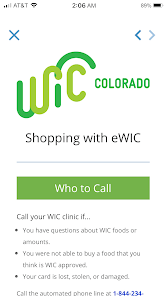
You can contact customer service through the app's help section or by visiting the official WICShopper website for support options.

2

How do I find the customer number for my WICShopper account?

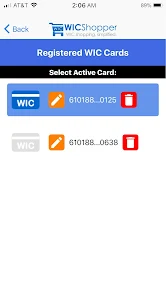
Your customer number is typically provided by your local WIC office; check your WIC card or contact them directly for assistance.

3

How do I log in to the WICShopper app?

Open the app, enter your email and password, then tap 'Log In' to access your account.

4

Is there a way to activate my WICShopper account?

If you received an activation link via email, click it to activate your account; otherwise, contact your local WIC office for instructions.

Editor's Choice