This site uses cookies to enhance your user experience. By clicking any link on this site you are giving your consent to our cookie policy. Read more
Reject
Accept All

Advertiser and Editorial Disclosures

Wheel of Fortune: TV Game

Wheel of Fortune: TV Game

verified

Scopely

4.6
Rating
10,000,000+ Downloads
4.5.4 Version
  • category

    Category: Word

  • price

    Price: free

  • age rating

    Age Rating: 10+

  • rating

    Rating: 4.6

  • available on

    Available on: /

  • updated on

    Updated on: Jul 7, 2026

Screenshot 1
Screenshot 2
Screenshot 3
Screenshot 4
Screenshot 5
Screenshot 6
Screenshot 7
Screenshot 8
Screenshot 9
Screenshot 10
Screenshot 11
Screenshot 12
Screenshot 13
Screenshot 14
Screenshot 15
Screenshot 16
Screenshot 17
Screenshot 18

Features & Highlights

Daily Bonuses

Log in daily to receive exciting bonuses and rewards that enhance your gameplay experience. These daily incentives encourage consistent play and give you the chance to earn extra spins or hints, keeping the excitement alive and motivating you to return for more word-solving fun.

Multiplayer Mode

Invite friends or challenge random players to a multiplayer showdown, bringing the competitive spirit of Wheel of Fortune to your device. This feature allows for real-time gameplay, where you can see how your skills stack up against others, making every game session a fun and interactive experience.

Puzzle Challenges

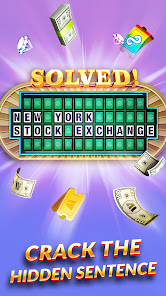
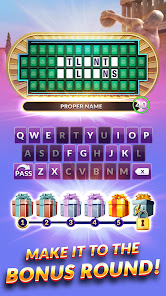
Test your word-solving skills with a variety of puzzles that capture the essence of the beloved TV game show. From classic phrases to themed categories, each puzzle presents a unique challenge, encouraging players to think creatively and strategically as they guess letters and form words.

Spin The Wheel

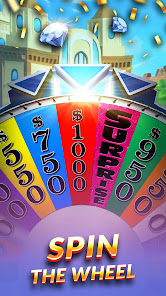
Experience the thrill of spinning the iconic wheel just like on TV. With each spin, players can win points, prizes, and even take chances on Bankrupt spaces, adding an exciting layer of strategy to the game. It’s a nostalgic and engaging way to feel like a contestant on the show.

Pros & Cons

Pros
  • Engaging gameplay keeps players entertained for hours
  • Chance to win exciting prizes and cash rewards
  • Easy to learn, suitable for all ages
  • Encourages social interaction among players
  • Variety of puzzles ensures fresh experiences each time
Cons
  • Limited player interaction reduces engagement levels
  • High reliance on luck diminishes skill value
  • Puzzles can be overly predictable and repetitive
  • Commercial breaks interrupt gameplay flow significantly

Real Experience Using Wheel of Fortune: TV Game

Application Scenarios

Wheel of Fortune: TV Game is designed for fans of the iconic television show who wish to bring the excitement of the game into their own homes. Ideal for family game nights, virtual gatherings with friends, or casual solo play, this app effectively simulates the thrilling atmosphere of the TV experience. Players can spin the wheel, solve word puzzles, and compete against friends or AI opponents. Whether you’re playing during a long commute, relaxing at home, or looking to challenge yourself during downtime, the app provides an engaging way to pass the time while testing your vocabulary and puzzle-solving skills.

User Experience

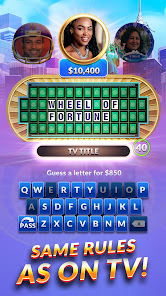
The user interface of Wheel of Fortune: TV Game is vibrant and intuitive, closely mirroring the aesthetics of the TV show. Users are greeted with a friendly layout that allows easy navigation through various game modes, including solo play and multiplayer options. The graphics are bright and appealing, adding to the overall enjoyment. Players appreciate the voiceovers and sound effects that enhance the immersive experience, making it feel like they are part of the show. The gameplay mechanics are straightforward, yet the challenge increases with each level, keeping players engaged. Users report the thrill of spinning the wheel and the satisfaction of solving puzzles, creating a sense of accomplishment. Additionally, the app's social features allow for friendly competition, with leaderboards and the ability to challenge friends, fostering a community feel.

Pricing

Wheel of Fortune: TV Game is available as a free download, which attracts many users looking to experience the thrill without initial investment. However, the app also offers in-app purchases for premium features, including special puzzles, additional wheel spins, and customization options. While the free version provides ample content, players who wish to enhance their experience may find value in these purchases. The pricing strategy is reasonable and reflects the quality of the entertainment provided, making it accessible for a wide audience.

Updates & Support

The developers of Wheel of Fortune: TV Game are committed to providing a seamless user experience through regular updates that introduce new puzzles, seasonal events, and enhanced features. Users can expect timely improvements and bug fixes, ensuring the app runs smoothly across devices. Moreover, customer support is readily available through the app, allowing players to report issues or seek assistance with ease. The active community surrounding the game also contributes to a supportive environment where players can share tips, tricks, and solutions, further enhancing the overall experience.

verified Security & Privacy Review

Security and privacy are paramount in the Wheel of Fortune: TV Game app, which implements robust measures to protect user data. The app adheres to industry standards for data encryption, ensuring that sensitive information remains secure during transmission and storage. User privacy is respected through transparent data collection practices, clearly outlined in the privacy policy. Permissions requested by the app are primarily related to gameplay functionalities, such as accessing the internet for real-time updates and notifications. Users are informed about these permissions at the point of installation, allowing for informed consent. Importantly, the app does not request unnecessary access to device features, minimizing potential privacy risks. Additionally, the app emphasizes user control over personal data, providing options to manage and delete information as needed. Regular updates are released to address security vulnerabilities, reflecting the developers' commitment to maintaining a secure gaming environment. Overall, Wheel of Fortune: TV Game prioritizes user security and privacy, making it a trustworthy choice for fans of the classic game show.

User Reviews

  • A Google user
    2026/06/19

    I like this game and I've been playing it for years, it is fun and challenging. Like that they change the game scenery to fit holiday events! Try your luck! The more frequently you play, it helps you learn how to get more points and helps you win and boost your fields of movement to the next city!

  • Jred2430
    2026/05/20

    just want to play WoF. I enjoyed that part. Too bad there's only one puzzle before the bonus round. Too bad it has started forcing this " helping hand", with no way to turn it off. I don't really understand or care about all the: diamonds piggy bank (full, but so what? can't seem to use for anything) stargazing, mill. mile, etc, etc. Endless ads that can't be closed. Uninstalling.

  • Maynard Nicholl (Pirate)
    2026/05/06

    DO NOT DOWNLOAD!!! This game is no fun because it doesn't have a description for each puzzle, which is half the fun. It ripps you off on the time for the infinity tickets. It makes you watch adds to play while there is still time on the clock. and the watch an add for more tickets doesn't work properly. And the watch video button doesn't work anymore

  • Diana Webster
    2026/03/29

    It is very challenging for hours of fun. It offers quite a good selection of varied puzzle topics. I also like how they stay current on themes for contests like Back -to-School, Rain Forest, and holidays such as Winter weather, Christmas, Thanksgiving, Valentine'sand Super Bowl. They have included a good number of diverse puzzle options to challenge yourself on. I see improvements to the game . And I can't believe there is no cost ... it still delivers fun times while keeping my brain sharp.

  • K C
    2026/03/19

    Notifications are loud and I can't turn them off. You have to have Facebook to have any personalization, and you have to finish a tutorial to turn off sounds. The game looked and played well, but I had to uninstall because I have to sleep and notifications woke me up. Edit: tried again, got several ads that you had to close the game to get rid of (waiting didn't work, no visible close button) and then one popped up in the middle of a round (and surprise, it was a scam) and I couldn't get back.

Review Source: Google Play store public user reviews.

FAQ

1

Does Wheel of Fortune: TV Game collect my personal data?

Wheel of Fortune: TV Game may collect personal data as outlined in its privacy policy, which typically includes information for account management and game improvements.

2

Does Wheel of Fortune: TV Game offer a free trial or free version?

Yes, Wheel of Fortune: TV Game often offers a free version with in-app purchases, allowing players to enjoy basic gameplay before deciding to purchase additional features or content.

3

Does Wheel of Fortune: TV Game require an internet connection?

Yes, Wheel of Fortune: TV Game typically requires an internet connection to play, as it connects players with online features, updates, and multiplayer options.

4

How can I contact support or send feedback for Wheel of Fortune: TV Game?

Players can contact support or send feedback for Wheel of Fortune: TV Game through the app's help section or the official website, where they can find contact information and support resources.

5

How do I manage or cancel my Wheel of Fortune: TV Game subscription?

Players can manage or cancel their Wheel of Fortune: TV Game subscription through their app store account settings, where they can find subscription options and make changes as needed.

How to use Wheel of Fortune: TV Game

1

How can I contact Customer Service for the Wheel of Fortune: TV Game app?

You can reach Customer Service through the app's settings or help section, or visit the official website for support options.

2

How do I activate my account in the Wheel of Fortune: TV Game app?

To activate your account, follow the link sent to your email during registration and complete the verification process.

3

How do I log in to the Wheel of Fortune: TV Game app?

Open the app, tap on the login button, and enter your credentials or connect through your social media account.

4

What is the customer number for the Wheel of Fortune: TV Game app?

The customer number is typically found in the app under settings or support; please check there for assistance.

What's New

Celebrate America’s 250th birthday with new events!- Play the July 4th Challenge Destination Event starting this Friday!- Celebrate America’s Independence with a diamond sale this weekend!- Grab the 4th of July animated frame only available in Vanna’s shop for a limited time!- Bug fixes and general improvements.

Editor's Choice