
 Home
Home  Apps
Apps  Games
Games  Windows
  Terms of Service
  Cookies & Privacy Policy
  About us
WeatherBug


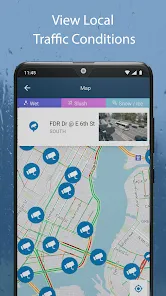
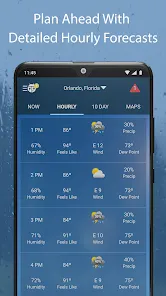
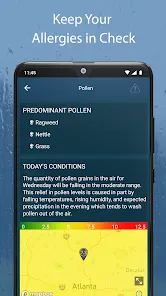
Information
- Category: Weather
- Price: Free
- Age Rating: /
- Rating: 3.9
- Developer: WeatherBug
- Version: 5.60.0-25
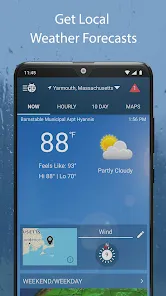
WeatherBug is a popular mobile app that provides users with real-time weather data. The app is available for both Android and iOS devices, and it's one of the most comprehensive weather apps on the market. In this blog post, we will take a look at the WeatherBug mobile app and explore its features and benefits. We will also provide a step-by-step guide on how to use the app to get the most out of it.
Features & Highlights
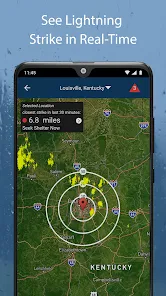
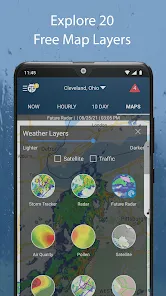
WeatherBug is not just your average weather app; it brings a comprehensive suite of features that make it an essential tool for anyone who wants to stay informed about the weather. Here are some core highlights that stand out:
Real Experience Using WeatherBug
Application Scenarios
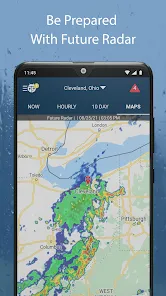
WeatherBug has become an indispensable part of my daily routine. Whether I’m planning a weekend getaway or just commuting to work, I rely on this app to keep me informed. For instance, last week, I had a family picnic planned at the local park. As the day approached, I checked WeatherBug multiple times to gauge the weather conditions. The real-time alerts and hourly forecasts were crucial in helping me decide to push the picnic to the following day when the weather looked much sunnier. On another occasion, while hiking in the mountains, the app’s interactive radar map helped me identify a storm brewing nearby, prompting us to head back before the downpour hit.
User Experience
The user interface of WeatherBug is intuitive and easy to navigate. Upon opening the app, I’m greeted with a clean layout that displays the current temperature, weather conditions, and a brief forecast. The feature workflow is seamless; I can easily swipe between different sections, such as hourly forecasts, radar maps, and alerts. Performance-wise, the app is quick to load, and I’ve rarely encountered lag issues. Overall, my feelings after using WeatherBug are overwhelmingly positive—it feels reliable, informative, and user-friendly, making it a joy to use every day.
Pricing
WeatherBug is free to download and use, which is fantastic considering the wealth of features it provides. While there are optional in-app purchases for additional features and an ad-free experience, I’ve found that the basic version is more than sufficient for my needs. The balance between free access and premium features is well-managed, ensuring that users can still enjoy a robust weather experience without shelling out any cash.
Updates & Support
The app is regularly updated with new features and improvements. I appreciate how the developers are proactive in enhancing functionality based on user feedback. Additionally, WeatherBug offers a support section where users can report issues or find help regarding common queries. The customer service response has been quite prompt, and I feel reassured knowing that support is readily available when needed.
Security & Privacy Review
When it comes to security and privacy, WeatherBug has taken steps to protect its users. The app is available on major platforms like the App Store and Google Play, ensuring it meets basic security standards. Registration is straightforward, requiring only minimal personal data—like your location to provide accurate weather updates. I appreciate that WeatherBug does not require excessive permissions, which is a common concern among users today.
Regarding ads and tracking behavior, the app does display ads, but they are not overly intrusive. I’ve noticed that the ads are relatively relevant to my interests, which is a plus. However, if you’re concerned about tracking behavior, it’s worth reviewing the app’s privacy policy to understand their data usage practices better. Overall, I feel comfortable using WeatherBug, knowing that my personal information is treated with care.
Pros 
-
 Stay updated with real-time forecasts
 - Access detailed radar maps easily
- Receive severe weather alerts promptly
- Enjoy customizable notifications daily
- Explore local weather news articles
- Track multiple locations seamlessly
Cons 
-
 Limited radar features available
 - Occasional inaccurate forecasts
- Ads can disrupt user experience
- User interface feels outdated
 Google Play
  App Store
 FAQ
What type of app is WeatherBug?
WeatherBug is a weather application that provides real-time weather updates, forecasts, and alerts. It helps users track local weather conditions effectively.
How to use WeatherBug
How do I activate premium features in the WeatherBug app?
To activate premium features, purchase a subscription through the app's settings or upgrade option in the menu.
How do I contact customer service for the WeatherBug app?
You can contact WeatherBug customer service through the app’s help section or visit their website for support options.
How do I find my customer number for the WeatherBug app?
The WeatherBug app does not require a customer number; simply log in with your email or social media account.
How do I log in to the WeatherBug app?
To log in, open the app and tap on the 'Log In' option, then enter your email and password or use a social media account.
Similar Apps














You May Like

The Weather Channel App
Weather
4.1

WeatherWise.app
Weather
4.3
Local Weather:Weather Forecast App
Weather
4.9

Room Temperature Thermometer
Weather
4.4

Windy.app
Weather
4.1

Precip
Weather
4.4

Weather Underground: Local Map
Weather
4.7
Weather Forecast - Live Alerts
Weather
4.6

Nautide: Tides, Wind, Waves +
Weather
4.5

Hanalei River
Weather
Barometer Pro
Weather
4.1

Aurora Track : Forecast Alerts
Weather