This site uses cookies to enhance your user experience. By clicking any link on this site you are giving your consent to our cookie policy. Read more
Reject
Accept All

Advertiser and Editorial Disclosures

Tinder Dating App: Chat & Date

Tinder Dating App: Chat & Date

verified Verified App

Developer: Tinder LLC

  • category

    Category: Dating

  • price

    Price: free

  • age rating

    Age Rating: 17+

  • rating

    Rating: 3.8

  • download

    Downloads: 100,000,000+

  • version

    Version: 17.1.0

Screenshot 1
Screenshot 2
Screenshot 3
Screenshot 4
Screenshot 5
Screenshot 6
Screenshot 7
Screenshot 8

Features & Highlights

In-App Messaging

Once you've matched with someone, the conversation can flow seamlessly through Tinder's in-app messaging feature. This allows users to chat without revealing personal phone numbers, keeping initial interactions safe and private. It's a great way to get to know your match before taking things further.

Location-Based Matching

Tinder uses your location to connect you with potential matches in your vicinity, making it easier to meet up in real life. Whether you're at home or traveling, you can discover new people nearby and expand your dating pool. This feature enhances spontaneity and the chance for real-life encounters.

Profile Customization

Users can express themselves fully with customizable profiles that include photos, bios, and interests. This helps to showcase your personality and attract like-minded individuals. With features like prompts and interest tags, you can spark engaging conversations and find deeper connections.

Swiping Made Simple

Tinder's iconic swiping mechanism allows users to quickly browse through potential matches with ease. Just swipe right to like or left to pass, making the process of finding a date both fun and efficient. It’s an intuitive way to connect with people nearby who share your interests.

Pros & Cons

Pros
  • Connect with potential matches in your area effortlessly.
  • Swipe through profiles quickly to find your type.
  • Chat instantly to break the ice and build rapport.
  • Explore diverse interests and lifestyles in one app.
  • Access a global community for dating beyond borders.
Cons
  • Limited user profiles can lead to superficial connections.
  • Frequent ghosting can create feelings of rejection and frustration.
  • Overwhelming choices may lead to decision fatigue and indecision.

Real Experience Using Tinder Dating App: Chat & Date

Application Scenarios

Tinder is designed to cater to a variety of dating scenarios, making it suitable for users looking for casual flings, serious relationships, or even just friendships. The swiping mechanism allows users to quickly filter through potential matches based on attraction, thereby promoting instant connections. Whether you are a busy professional seeking companionship or a college student wanting to meet new people, Tinder provides a platform that adapts to your social needs. The app also features a location-based matching system, ensuring that users can connect with people nearby, which is perfect for those who enjoy meeting up for spontaneous dates or social events.

User Experience

The user experience on Tinder is intuitive and engaging. Upon signing up, users can create a profile complete with photos and a brief bio, which helps to convey personality and interests. The interface is sleek, allowing users to swipe right to like or left to pass on profiles. The chat feature facilitates seamless communication once a match is made, encouraging users to start conversations. However, some may find the emphasis on physical appearance a bit superficial, as matches are often made based on first impressions. Additionally, the presence of ads can occasionally disrupt the experience, but overall, the app is user-friendly and fosters a vibrant community. Many users appreciate the ability to customize their search preferences, allowing for a more tailored dating experience.

Pricing

Tinder offers a free version that provides access to basic features, but for users looking for enhanced functionality, there are premium subscription options like Tinder Plus, Tinder Gold, and Tinder Platinum. These subscriptions unlock features such as unlimited swipes, the ability to see who liked you, and the option to swipe in different locations. The pricing varies by location and subscription length, with discounts often available for longer commitments. While some users find the cost worthwhile for the added features, others may feel that the free version is sufficient for their dating needs.

Updates & Support

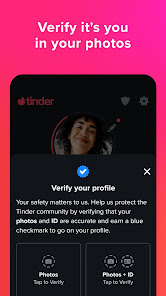
Tinder regularly updates its app to improve user experience, introduce new features, and enhance security. Recent updates have included enhancements to the algorithm for better match suggestions and improved safety features, such as photo verification and panic buttons. Customer support is accessible through the app, offering FAQs and the option to report issues. However, response times can vary, and some users have reported challenges in receiving timely assistance. Overall, the app’s commitment to continual improvement and user safety demonstrates Tinder's dedication to providing a positive dating experience.

verified Security & Privacy Review

The Tinder Dating App prioritizes user security and privacy, implementing various measures to protect personal information. The app utilizes encryption to secure data transmission, ensuring that sensitive communications remain confidential. Additionally, Tinder has a robust verification process to reduce the risk of fake profiles, enhancing user trust within the platform. Tinder's privacy practices are transparent, providing users with clear information regarding data collection and sharing. Users can control their privacy settings, including options to limit who can view their profiles and interact with them. However, the app requires access to certain permissions, such as location and contacts, to enhance matchmaking and user experience. While Tinder collects data to personalize services and improve functionality, it emphasizes that user data is handled responsibly. The app's privacy policy outlines how information is used, shared, and stored, giving users insight into their data rights. Overall, Tinder takes significant steps to safeguard user privacy, but users should remain vigilant about their personal information and adjust settings according to their comfort levels.

Reviews

3.8

“Great for meeting new people quickly!”

“User-friendly interface, easy to navigate.”

“Variety of profiles, lots of options.”

“Messaging features could be improved.”

“Occasional glitches, but overall a solid app.”

FAQ

1

Can I submit suggestions or feedback to Tinder: Dating app. Meet. Chat?

Yes, Tinder allows users to submit suggestions and feedback through their app or website, often in the help or support sections.

2

Does Tinder: Dating app. Meet. Chat collect my personal data?

Yes, Tinder collects personal data such as location, profile information, and interaction data to improve user experience and provide personalized matches.

3

Does Tinder: Dating app. Meet. Chat support offline use?

Tinder requires an internet connection to function, so it does not support offline use.

4

How do I cancel my Tinder: Dating app. Meet. Chat subscription?

You can cancel your Tinder subscription through the app store where you purchased it, either in your iOS or Android settings, or by following the cancellation instructions on the Tinder website.

5

How much does a subscription to Tinder: Dating app. Meet. Chat cost?

Subscription costs for Tinder vary based on the plan you choose, typically ranging from a few dollars per month to more for advanced features like Tinder Gold or Tinder Plus.

How to use Tinder Dating App: Chat & Date

1

How can I activate my Tinder account?

To activate your Tinder account, download the app, sign up with your phone number or social media, and follow the verification steps sent to your device.

2

How can I contact Tinder's customer service?

You can reach Tinder's customer service through the app under "Settings" > "Help & Support" or by visiting their website's help center.

3

How do I log in to my Tinder account?

Open the Tinder app, select "Log In," and choose to sign in using your phone number, Facebook, or Google account. Follow the prompts to access your account.

4

What is Tinder's customer service phone number?

Tinder does not provide a direct phone number for customer service; support is primarily available via the app and website.

Editor's Choice