This site uses cookies to enhance your user experience. By clicking any link on this site you are giving your consent to our cookie policy. Read more
Reject
Accept All

Advertiser and Editorial Disclosures

SimCity BuildIt

SimCity BuildIt

verified Verified App

Developer: ELECTRONIC ARTS

  • category

    Category: Simulation

  • price

    Price: free

  • age rating

    Age Rating: 10+

  • rating

    Rating: 4.2

  • download

    Downloads: 100,000,000+

  • version

    Version: 1.74.1.150526

Screenshot 1
Screenshot 2
Screenshot 3
Screenshot 4
Screenshot 5
Screenshot 6
Screenshot 7
Screenshot 8
Screenshot 9
Screenshot 10
Screenshot 11
Screenshot 12
Screenshot 13
Screenshot 14
Screenshot 15
Screenshot 16
Screenshot 17
Screenshot 18

Features & Highlights

City Customization

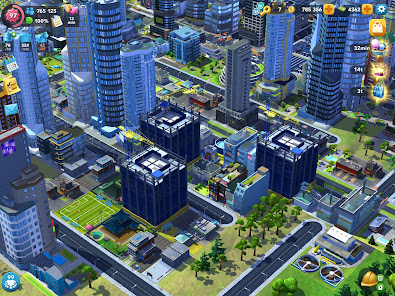
Unleash your creativity by designing your own unique city. From choosing the layout of roads and buildings to selecting the aesthetics of your skyline, SimCity BuildIt allows you to create a vibrant metropolis that reflects your personal style and vision.

Exciting Events

Participate in a variety of in-game events to unlock exclusive rewards and boost your city's development. These events often feature unique challenges and competitions, keeping gameplay fresh and engaging while allowing you to connect with the community.

Multiplayer Trading

Engage with friends and other players through the trading system, which enables you to exchange resources and goods. This feature adds a social element to the game, encouraging collaboration and strategic planning to enhance your city-building experience.

Realistic Economy

Manage your city's economy by balancing supply and demand for goods. You'll need to produce essential resources, trade with other players, and ensure your citizens are happy, all while keeping an eye on your budget to avoid bankruptcy.

Pros & Cons

Pros
  • Engaging city-building experience for creative players
  • Play anytime, anywhere on mobile devices
  • Regular updates keep the game fresh and exciting
  • Trade with friends for unique resources and items
  • Customization options allow for unique city designs
Cons
  • Limited building space restricts city expansion
  • In-game purchases lead to pay-to-win mechanics
  • Resource management can become tedious and frustrating
  • Frequent updates may disrupt gameplay experience

Real Experience Using SimCity BuildIt

Application Scenarios

SimCity BuildIt offers a versatile gameplay experience that caters to a wide range of players. Whether you are a casual gamer looking to pass the time or a dedicated strategist seeking to create the ultimate city, this app accommodates both styles. You can build sprawling metropolises, manage resources, and engage in trade with friends and other players around the world. The game’s scenarios are varied; you can focus on constructing essential infrastructure, such as roads and public services, or indulge in decorative elements that beautify your city. Events and challenges keep the gameplay fresh, encouraging players to adapt their strategies and make quick decisions. Whether you’re competing in a city competition or tackling disaster scenarios, the application scenarios are designed to keep you engaged and motivated.

User Experience

The user experience in SimCity BuildIt is remarkable, characterized by intuitive controls and stunning graphics. The interface is user-friendly, making it easy for players of all ages to navigate through the various features. Building and managing your city feels rewarding, as every decision impacts the happiness and productivity of your citizens. The vibrant 3D graphics and animations bring your city to life, making it visually appealing and immersive. Players will find themselves invested in their creations, as the game allows for personalization and creativity. Moreover, the social aspects of the game—such as trading with friends and joining clubs—enhance the experience, fostering a sense of community among players. However, some users have reported occasional glitches and slow loading times, which can detract from the overall enjoyment.

Pricing

SimCity BuildIt is free to download and play, making it accessible to a wide audience. However, it incorporates a freemium model that allows players to make in-app purchases for various resources, premium currency, and exclusive items. While the game can be played without spending money, players who wish to progress faster or access special features may find themselves tempted to invest. Prices for in-app purchases vary, and players should be mindful of their spending habits, especially as the game can encourage microtransactions to expedite building and resource collection.

Updates & Support

The developers of SimCity BuildIt are committed to providing regular updates, ensuring that the game evolves and remains engaging for its user base. New features, seasonal events, and bug fixes are frequently rolled out, demonstrating the developers’ dedication to improving the game experience. Support is readily available through the app, where players can access FAQs, troubleshooting guides, and customer service. Community forums and social media channels also provide platforms for players to share feedback and connect with the development team, enhancing the overall support structure for users. This proactive approach to updates and support helps maintain player satisfaction and encourages long-term engagement with the app.

verified Security & Privacy Review

SimCity BuildIt takes user privacy and data security seriously, implementing several measures to protect personal information. The app collects data such as device identifiers and gameplay statistics to enhance user experience and provide tailored content. However, it is essential for users to be aware of the permissions required upon installation. The app requests access to the device's storage and internet connection, which are necessary for gameplay and the ability to download updates. While these permissions are standard for mobile games, users should regularly review app permissions in their device settings to ensure they are comfortable with the access granted. SimCity BuildIt adheres to industry standards for data protection, employing encryption to safeguard data transmission. The app's privacy policy outlines the types of data collected and how it is used, giving users transparency regarding their information. Nevertheless, players should remain vigilant about sharing personal information and monitor any changes to the app's privacy policies over time.

Reviews

4.2

“Addictive gameplay, great for city-building fans”

“Challenging but rewarding resource management mechanics”

“Graphics and animations are stunning and immersive”

“Frequent updates keep the game fresh and exciting”

“In-app purchases can be frustrating at times”

FAQ

1

Does SimCity BuildIt collect my personal data?

Yes, SimCity BuildIt may collect personal data as outlined in its privacy policy, which includes information related to your gameplay and interactions within the app.

2

Does SimCity BuildIt offer a free trial or free version?

SimCity BuildIt is free to download and play, but it does offer in-app purchases for additional content and resources.

3

Does SimCity BuildIt require an internet connection?

Yes, SimCity BuildIt requires an internet connection to play, as it features online multiplayer elements and regular updates.

4

How can I contact support or send feedback for SimCity BuildIt?

Players can contact support or send feedback through the in-game help feature or by visiting the official EA support website for SimCity BuildIt.

5

How do I manage or cancel my SimCity BuildIt subscription?

Since SimCity BuildIt does not have a traditional subscription model, players can manage in-app purchases through their device's app store settings, where they can also set restrictions on purchases.

How to use SimCity BuildIt

1

How can I contact Customer Service for SimCity BuildIt?

You can contact Customer Service through the in-game help section or visit the official EA support website for assistance.

2

How do I find the Customer Number for my SimCity BuildIt account?

Your Customer Number can be found in the settings or account info section within the app.

3

How do I log in to my SimCity BuildIt account?

Open the app, go to settings, and select the login option to connect with your EA account or Game Center.

4

Is there a way to activate my SimCity BuildIt account?

If you need to activate your account, simply log in with your existing EA account credentials in the app.

Editor's Choice