This site uses cookies to enhance your user experience. By clicking any link on this site you are giving your consent to our cookie policy. Read more
Reject
Accept All

Advertiser and Editorial Disclosures

Shopping List - Listonic

Shopping List - Listonic

verified Verified App

Developer: Listonic - Smart Grocery Shopping

  • category

    Category: Shopping

  • price

    Price: free

  • age rating

    Age Rating: Everyone

  • rating

    Rating: 4.7

  • download

    Downloads: 10,000,000+

  • version

    Version: 9.6.3

Screenshot 1
Screenshot 2
Screenshot 3
Screenshot 4
Screenshot 5
Screenshot 6
Screenshot 7
Screenshot 8

Features & Highlights

Automatic Suggestions

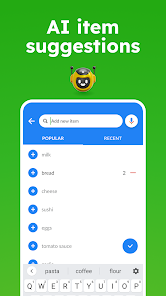
Listonic learns from your shopping habits and provides automatic suggestions for frequently purchased items. This intuitive feature saves you time by predicting what you might need, allowing you to quickly populate your list based on previous purchases.

Custom Categories

Organize your shopping items into custom categories for a more streamlined shopping experience. This feature helps you group similar products together, making it easier to navigate the store and find everything you need without unnecessary backtracking.

Smart Sharing

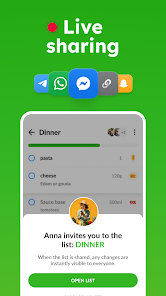
Easily share your shopping lists with family and friends, making grocery shopping a collaborative effort. Whether you're planning a family meal or a party, everyone can add items to the list, ensuring nothing gets forgotten and making the shopping experience smoother for everyone involved.

Voice Input

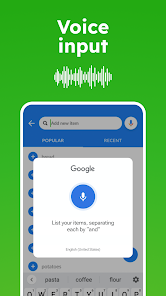
Add items to your shopping list quickly and hands-free using voice input. Just speak the name of the item, and Listonic will take care of the rest, allowing you to multitask and save time while ensuring your list is always up to date.

Pros & Cons

Pros
  • Easily organize items into categories for efficient shopping.
  • Share your shopping list with family and friends for collaboration.
  • Access your lists from any device with cloud synchronization.
  • Use voice input to quickly add items while on the go.
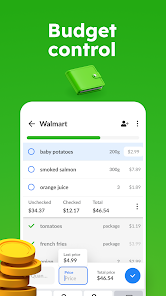
  • Track prices and quantities to manage your budget effectively.
Cons
  • Limited offline functionality can hinder accessibility during shopping trips.
  • Some users report a steep learning curve for new features.
  • Occasional syncing issues may cause data loss or inconsistencies.

Real Experience Using Shopping List - Listonic

Application Scenarios

Shopping List - Listonic is a versatile tool designed for anyone looking to streamline their grocery shopping experience. Whether you’re a busy parent juggling multiple schedules, a student managing a tight budget, or a culinary enthusiast planning meals for the week, this app caters to a variety of needs. It allows users to create multiple shopping lists for different occasions—be it weekly grocery runs, holiday meal prep, or even quick trips to the store. The app shines in collaborative scenarios; users can share lists with family or friends to ensure everyone is on the same page. Additionally, with its smart suggestion feature, it helps users recall frequently purchased items, making it easier to build a comprehensive list at any time.

User Experience

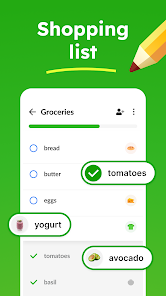
The user experience of Shopping List - Listonic is intuitive and user-friendly. Upon opening the app, users are greeted with a clean interface that emphasizes simplicity and efficiency. Adding items to lists is a breeze—users can type directly or utilize voice input for hands-free convenience. The app supports barcode scanning, which further accelerates the list-building process. Organizing items by categories such as dairy, produce, or pantry staples enhances the shopping experience, allowing users to navigate the store more efficiently. Additionally, the app includes a handy feature that allows users to check off items as they shop, providing a satisfying and organized way to track progress. The ability to sync lists across devices ensures that users can access their shopping lists anytime, anywhere.

Pricing

Shopping List - Listonic is available for free, making it an accessible option for anyone looking to improve their shopping efficiency. The app offers premium features through a subscription model, which unlocks additional functionalities such as offline access, advanced sharing options, and personalized shopping suggestions. The pricing is competitive compared to similar apps in the market, and given the value it provides, many users find the premium subscription worth the investment. The free version is robust enough for everyday use, ensuring that even those reluctant to pay can benefit significantly from its features.

Updates & Support

Regular updates are a hallmark of Shopping List - Listonic, with the development team committed to enhancing user experience based on feedback. These updates often include new features, performance improvements, and bug fixes, ensuring the app remains functional and user-friendly. The support options are commendable, with a dedicated help center and responsive customer service ready to assist users with any inquiries or issues. The app also encourages user feedback, creating a community-driven approach to development that fosters continuous improvement. Overall, users can feel confident knowing that their experience is valued and that the app is consistently evolving to meet their needs.

verified Security & Privacy Review

The Shopping List - Listonic app prioritizes user security and privacy through a variety of measures. It employs encryption protocols to protect data both in transit and at rest, ensuring that sensitive information is safeguarded against unauthorized access. The app's privacy policy clearly outlines its data collection practices, informing users about the types of data collected, such as shopping lists and preferences, and how this data is utilized to enhance user experience. Listonic requires certain permissions to function effectively, including access to device storage for saving lists and notifications for reminders. Users are advised to review these permissions carefully during installation and can adjust them in the device settings if necessary. The app does not sell user data to third parties, reinforcing its commitment to user privacy. Furthermore, Listonic provides options for users to manage their data, including the ability to delete accounts and associated information upon request. Overall, the app demonstrates a strong commitment to maintaining user privacy and securing personal data, making it a trustworthy choice for managing shopping lists.

Reviews

4.7

“Easy to use and super helpful for grocery shopping”

“Love the sharing feature with family and friends”

“Great organization tools for different shopping categories”

“Reliable app that saves me time every week”

“Syncs perfectly across all my devices, very convenient”

FAQ

1

Can I submit suggestions or feedback to Shopping List - Listonic?

Yes, users are encouraged to submit suggestions or feedback through the app or via their official website, as they value user input for future updates and improvements.

2

Does Shopping List - Listonic collect my personal data?

Shopping List - Listonic may collect certain personal data to enhance user experience, but it adheres to privacy policies and guidelines to protect user information.

3

Does Shopping List - Listonic support offline use?

Yes, Shopping List - Listonic allows users to access and manage their shopping lists offline, making it convenient for use in areas without internet connectivity.

4

How do I cancel my Shopping List - Listonic subscription?

Users can cancel their Shopping List - Listonic subscription through the app store settings on their device or by following the cancellation instructions provided in the app.

5

How much does a subscription to Shopping List - Listonic cost?

The subscription cost for premium features in Shopping List - Listonic varies, but typically it offers monthly and annual plans that provide additional functionalities.

How to use Shopping List - Listonic

1

Can I change my customer number if needed?

Unfortunately, customer numbers cannot be changed. If you have concerns, please contact customer service for support.

2

How do I activate my Listonic account after signing up?

After signing up, check your email for an activation link. Click on it to activate your account. If you don’t receive it, check your spam folder or contact customer service.

3

How do I log in to my Listonic account?

To log in, open the app and enter your registered email and password. If you forget your password, use the "Forgot Password?" link.

4

How do I reach customer service for Listonic?

You can reach customer service through the app's support section or visit the Listonic website for contact options.

5

I need help with my Listonic account activation. Who can I contact?

For account activation help, please contact customer service directly. They can guide you through the activation process.

Editor's Choice