This site uses cookies to enhance your user experience. By clicking any link on this site you are giving your consent to our cookie policy. Read more
Reject
Accept All

Advertiser and Editorial Disclosures

My H-E-B

My H-E-B

verified Verified App

Developer: H-E-B

  • category

    Category: Shopping

  • price

    Price: free

  • age rating

    Age Rating: Everyone

  • rating

    Rating: 4.7

  • download

    Downloads: 1,000,000+

  • version

    Version: 2.69.1.1

Screenshot 1
Screenshot 2
Screenshot 3
Screenshot 4
Screenshot 5
Screenshot 6
Screenshot 7

Features & Highlights

Digital Coupons

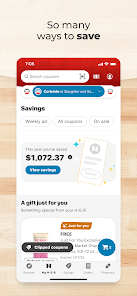
Save money effortlessly with exclusive digital coupons available in the app. Browse through a variety of offers, add them to your account, and redeem them at checkout, making your shopping experience not only convenient but also budget-friendly.

Online Ordering

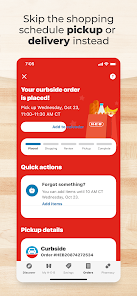
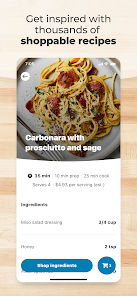
Skip the lines and shop from the comfort of your home with online ordering. Choose your favorite products, schedule a pickup or delivery time, and enjoy the convenience of having your groceries ready when you need them, all through the My H-E-B app.

Shopping List Creation

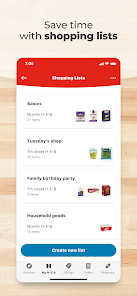
Easily create and manage your shopping lists with My H-E-B. This feature allows you to add items directly from the app, categorize them by department, and check off items as you shop, ensuring you never forget a crucial ingredient during your grocery run.

Store Locator

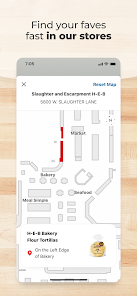
Find your nearest H-E-B store with just a few taps. The store locator feature provides directions, hours of operation, and even highlights special services available at each location, ensuring you always know where to go for your grocery needs.

Pros & Cons

Pros
  • Convenient shopping with easy online ordering
  • Wide selection of fresh, quality groceries
  • Exclusive discounts and rewards for members
  • Personalized recommendations for tailored shopping
  • Fast delivery and curbside pickup options available
Cons
  • Limited product selection compared to larger supermarkets
  • Higher prices on some items than competitors
  • Inconsistent stock availability can frustrate shoppers
  • App navigation can be confusing for users

Real Experience Using My H-E-B

Application Scenarios

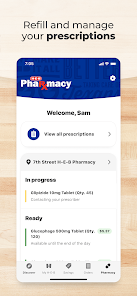
The My H-E-B app is designed to enhance your grocery shopping experience by offering a wide range of features tailored to meet the needs of everyday users. Whether you're planning a weekly grocery haul, preparing for a special event, or simply in need of last-minute supplies, this app serves as your digital shopping companion. Users can easily browse through the store's extensive inventory, create shopping lists, and even locate items within the store using the app’s store map feature. Additionally, the app is perfect for those who prefer online shopping, as it provides options for curbside pickup and home delivery, making it convenient for busy individuals or families.

User Experience

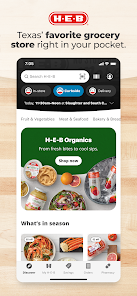
The user experience of the My H-E-B app is generally seamless and intuitive. Upon downloading, users are greeted with a clean and organized interface that allows for easy navigation. The app's search functionality is robust, enabling users to quickly find specific products, filtering by dietary needs or preferences if necessary. Many users appreciate the personalized touch, as the app remembers previous purchases and suggests items based on shopping habits. The integration of digital coupons and special promotions provides additional savings, enhancing the overall shopping experience. However, some users have reported occasional glitches or slow loading times during peak hours, which can be frustrating. Overall, the app is user-friendly and designed with the shopper’s convenience in mind.

Pricing

The My H-E-B app is completely free to download and use, which is a significant advantage for budget-conscious shoppers. There are no hidden fees associated with accessing the app's features, including shopping lists and digital coupons. While users may find certain items priced higher than competitors, the app frequently offers exclusive deals and promotions that can lead to substantial savings. Additionally, H-E-B's commitment to providing quality products at competitive prices makes the app not only a useful tool but also a cost-effective solution for grocery shopping.

Updates & Support

The developers behind the My H-E-B app are committed to providing regular updates to improve usability and functionality based on user feedback. New features and enhancements are regularly rolled out, ensuring that the app remains current with user needs and technological advancements. For support, users can easily access a help section within the app, which includes FAQs and troubleshooting tips. Alternatively, customer service can be reached through the app or the H-E-B website, providing prompt assistance for any issues that may arise. The responsive nature of the support team is a notable strength, as they assist users in navigating through any challenges effectively.

verified Security & Privacy Review

The My H-E-B app prioritizes user security and privacy by employing industry-standard encryption protocols to protect sensitive information. All data transmitted through the app is secured, ensuring that personal and financial details remain confidential during transactions. Users are required to create an account, which involves providing personal information such as name, email address, and payment details. The app has a clear privacy policy that outlines how user data is collected, used, and shared. H-E-B commits to using this data primarily for enhancing the shopping experience, personalized recommendations, and order processing. The app requests several permissions, including location access for store locator features and notifications for order updates. Users can manage these permissions through their device settings, allowing for greater control over their personal data. H-E-B does not sell user information to third parties, aligning with best practices for consumer privacy. Overall, the My H-E-B app demonstrates a strong commitment to protecting user data, making it a reliable choice for shopping convenience while maintaining privacy standards.

Reviews

4.7

“Great shopping experience with easy navigation!”

“Love the curbside pickup feature.”

“App crashes occasionally, needs improvement.”

“Weekly deals section is super helpful.”

“User-friendly interface and reliable grocery delivery.”

FAQ

1

Does My H-E-B collect my personal data?

Yes, My H-E-B collects certain personal data to provide personalized services, improve user experience, and comply with legal requirements. You can review their privacy policy for more details.

2

Does My H-E-B offer a free trial or free version?

My H-E-B is free to download and use, with no subscription required for basic features. However, some premium services may involve additional costs.

3

Does My H-E-B require an internet connection?

Yes, My H-E-B requires an active internet connection to access features such as online shopping, promotions, and account management.

4

How can I contact support or send feedback for My H-E-B?

You can contact My H-E-B support through the app's help section or visit their official website for additional support options, including email and customer service numbers.

5

How do I manage or cancel my My H-E-B subscription?

You can manage or cancel your My H-E-B subscription directly through the app's settings or your account profile, following the provided instructions for subscription management.

How to use My H-E-B

1

Can I change my customer number later?

Unfortunately, customer numbers cannot be changed once assigned. For any issues, please contact customer service for help.

2

Can I use my customer number for online orders?

Yes, you can use your customer number for online orders to earn rewards and access special offers.

3

How can I update my customer information on My H-E-B?

You can update your customer information by logging into your account and navigating to the profile settings section.

4

How do I activate my My H-E-B account?

To activate your account, click on the activation link sent to your email after registration and follow the prompts.

5

How do I contact customer service for My H-E-B?

You can reach My H-E-B customer service by calling the support line listed on our website or using the chat feature in the app.

Editor's Choice