Home
Home  Apps
Apps  Games
Games  Windows
  Topics
  Terms of Service
  Cookies & Privacy Policy
  About us
 Delivery Estimates
Get accurate delivery estimates that help you plan ahead. AfterShip Package Tracker analyzes data from carriers to provide you with realistic timeframes, helping you manage expectations and avoid unnecessary delays.


AfterShip Limited
 4.6
4.6 
Category: Shopping

Price: free

Age Rating: Everyone

Rating: 4.6

Available on: /

Updated on: Mar 3, 2026
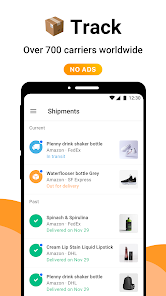
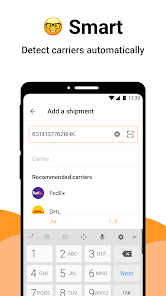
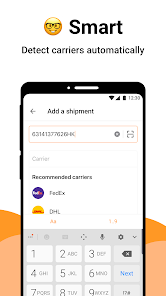
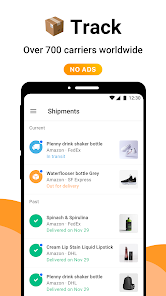
Get accurate delivery estimates that help you plan ahead. AfterShip Package Tracker analyzes data from carriers to provide you with realistic timeframes, helping you manage expectations and avoid unnecessary delays.
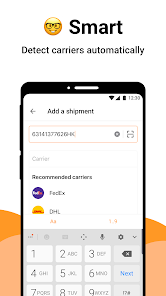
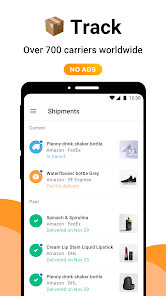
No need to download multiple apps—AfterShip Package Tracker supports over 700 carriers worldwide. This feature simplifies your tracking experience, allowing you to consolidate all your shipments and effortlessly manage deliveries from various providers in one place.
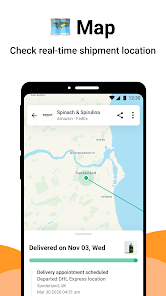
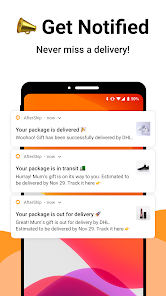
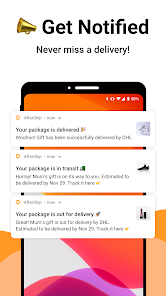
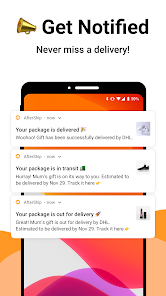
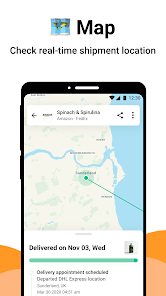
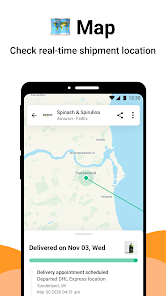
Stay updated with real-time tracking notifications that keep you informed about your package's journey. AfterShip Package Tracker provides instant alerts for any changes in status, ensuring you're always in the loop from shipment to delivery.
The app boasts a sleek and intuitive interface that makes tracking packages a breeze. With easy navigation and a clean design, you'll find it simple to access shipment details and monitor progress without any hassle.

 Real-time tracking updates keep you informed about your package's location. User-friendly interface simplifies the tracking process for all users. Supports multiple carriers, providing a unified tracking experience. Custom notifications alert you to important shipping milestones. Enhanced customer support ensures quick assistance for any inquiries.
 Limited customization options for tracking notifications may not meet all user needs. Inconsistent tracking information can lead to confusion and frustration for users. The mobile app may lack some features available on the desktop version.
 AfterShip Package Tracker is an invaluable tool for anyone who frequently shops online or manages shipments. Whether you are a business owner tracking customer orders or an individual keeping tabs on packages from various retailers, this app streamlines the entire process. With support for over 700 carriers worldwide, users can consolidate all their tracking needs in one place. It’s particularly beneficial during holiday seasons or major sales events when package volumes increase significantly. The app not only allows users to track deliveries but also provides notifications for each stage of the shipping process, ensuring that you are always informed about your package’s whereabouts. From e-commerce enthusiasts to small business owners, AfterShip caters to a wide range of scenarios where tracking and delivery updates are crucial.
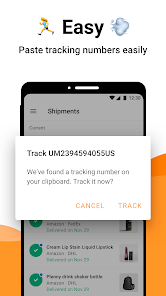
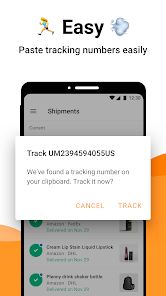
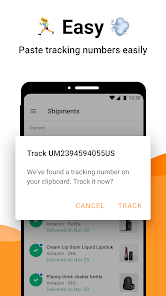
The user experience of AfterShip Package Tracker is designed with simplicity and efficiency in mind. Upon launching the app, users are greeted with an intuitive interface that makes adding new shipments a breeze. The app allows you to input tracking numbers manually or via a simple copy-paste method, which saves valuable time. Once a package is added, users receive real-time notifications, providing updates on delivery status directly to their smartphones. The visual representation of the tracking status is user-friendly, allowing users to quickly gauge where their package is in the shipping process. Additionally, the app’s ability to group multiple shipments under one account enhances the experience, making it easy to manage multiple orders simultaneously. Overall, AfterShip excels in offering a seamless and hassle-free tracking experience.
AfterShip Package Tracker offers a free tier that allows users to track a limited number of shipments effectively, making it accessible for casual users. For those who require additional features, such as tracking multiple packages or accessing advanced analytics, AfterShip offers premium plans at reasonable prices. The premium subscription provides added benefits like branded tracking pages for businesses, advanced reporting tools, and priority customer support. This tiered pricing strategy ensures that both casual users and business owners find a plan that suits their needs without feeling overwhelmed by unnecessary costs.
AfterShip is committed to providing regular updates and maintaining an active support system for its users. The app frequently rolls out updates that enhance functionality, improve user experience, and expand carrier support. Users can expect new features and bug fixes to maintain the app's reliability. The company also offers extensive support resources, including a dedicated help center filled with FAQs, guides, and troubleshooting tips. For more personalized assistance, users can reach out to the customer support team through email or live chat. The responsiveness and efficiency of AfterShip’s support make it a trustworthy choice for those relying on timely package tracking.
Security & Privacy Review
 Google Play
  App Store


Devs are working really hard on this app! I keep finding new and cool stuff. If you don't use the email sync feature, you're really missing out! it automatically imports order confirmations that are pending shipment, as well as tracking numbers that have already shipped. It even adds photos of your order items next to the title, which makes finding things so much easier.
This works much better than any app I've had before. Purchases are seamlessly added to this for future tracking. The only negative so far is when an order is made and another item is added before shipment (Amazon). In that instance, upon shipment one item will be tracked and the other one ignored even though they are being sent at the same time. It's not hard to figure out, but slightly annoying nonetheless.
all I need right where I need it. my trckng info is easy to find. if there is an issue like a delay due to lost/stolen pckg, I can easily find shipper info & what the recent details are. when I have an order from a place very far away, like UAE, for example, I simply add the trckng nmbr & carrier info. the app then registers my pckg immediately & helps track it until it arrives. lastly, I am not bombarded w/ irrelevant sales info that only convolutes this type of app, my favorite part!
This app is great! It automatically keeps up with all of your packages and also tracks them so u know exactly where they are and when they'll be delivered. All u gotta do is sign up and it's as simple as that. It also gives u a real time location of your packages 24-7. You don't gotta keep up with all those tracking numbers the app does it for you.
Great app as far it updates more on time and ect ! the only issue it seems to have is if you're package is delivering from a different state/ needs to go on boat and or plane it will not update on the map the app provides when it arrives at postal services in the state its being delivered to its a common issue among these kinds of apps so its to be expected so I won't hold them accountable on that so if this happens to you and your new on the app don't fret your package is still being shipped
Review Source: Google Play store public user reviews.
Yes, users can submit suggestions or feedback directly through the app or by contacting customer support to help improve the application.
Yes, AfterShip Package Tracker - Tr may collect personal data to provide its services, but it adheres to privacy policies to protect users' information.
AfterShip Package Tracker - Tr requires an internet connection for real-time tracking updates, but users can view previously loaded tracking information when offline.
Users can cancel their AfterShip Package Tracker - Tr subscription through their account settings within the app or by following the cancellation instructions provided by their app store.
The cost of a subscription to AfterShip Package Tracker - Tr varies depending on the plan chosen, and users can check the app for the most current pricing details.
Unfortunately, once your account is activated, the customer number cannot be changed. Please contact customer service for any special requests or concerns.
You can reach our customer service team via the support section on our website or through the Help Center. We're here to assist you!
To update your email address, log in to your account, navigate to account settings, and change your email. Save the changes to apply.
To activate your account, check your email for the activation link sent after registration. Click the link to complete the activation process.
To log in, visit the AfterShip website, enter your email and password, then click the "Log In" button. If you encounter issues, use the "Forgot Password" option.

Wish: Shop and Save

Amazon compras

eBay online shopping & selling

Etsy: Shop Home, Style & More

Costco Wholesale

Sam's Club: Shopping & Savings

Vinted: Shop & sell pre-loved

OfferUp: Buy. Sell. Simple.

Dollar General-Digital Coupons

The Home Depot

Fetch: America’s Rewards App

Affirm: Buy now, pay over time