This site uses cookies to enhance your user experience. By clicking any link on this site you are giving your consent to our cookie policy. Read more
Reject
Accept All

Advertiser and Editorial Disclosures

Spades

Spades

verified Verified App

Developer: AI Factory Limited

  • category

    Category: Card

  • price

    Price: free

  • age rating

    Age Rating: Everyone

  • rating

    Rating: 4.6

  • download

    Downloads: 5,000,000+

  • version

    Version: 1.991

Screenshot 1
Screenshot 2
Screenshot 3
Screenshot 4
Screenshot 5
Screenshot 6
Screenshot 7
Screenshot 8
Screenshot 9
Screenshot 10
Screenshot 11
Screenshot 12
Screenshot 13
Screenshot 14
Screenshot 15
Screenshot 16
Screenshot 17
Screenshot 18
Screenshot 19
Screenshot 20
Screenshot 21
Screenshot 22
Screenshot 23
Screenshot 24

Features & Highlights

AI Opponents

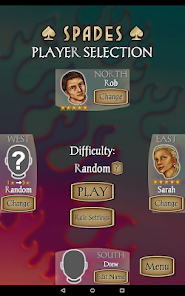
For those looking to practice or enjoy a game solo, Spades features intelligent AI opponents that provide a challenging yet enjoyable experience. These virtual players adapt to your strategies, helping you sharpen your skills while keeping the gameplay engaging when friends aren't available.

Customizable Rules

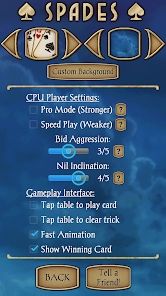
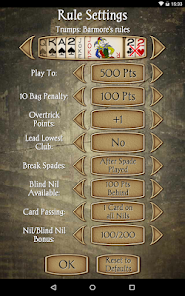
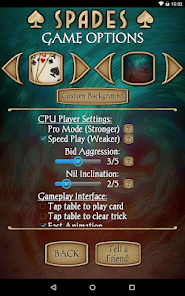
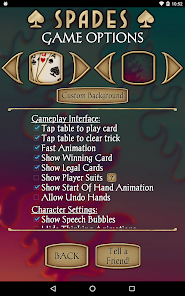
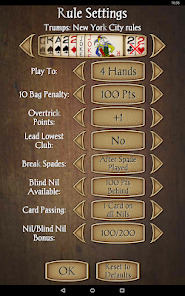
Spades offers a unique feature that allows players to customize the game rules according to their preferences. Whether it's adjusting the scoring system or setting specific house rules, you can tailor the experience to suit your group's play style, making every game feel fresh and engaging.

Intuitive Interface

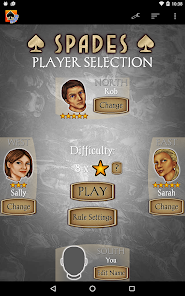
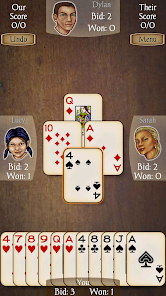
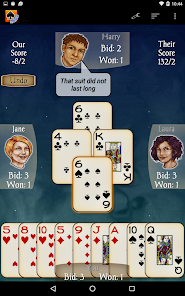
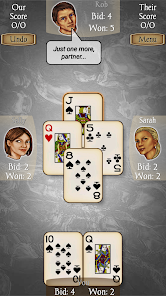
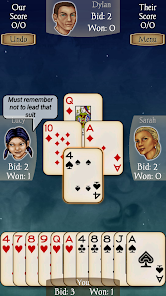
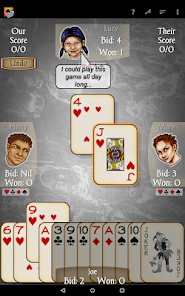
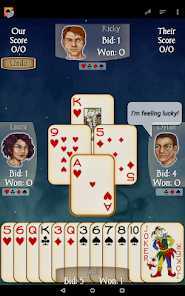
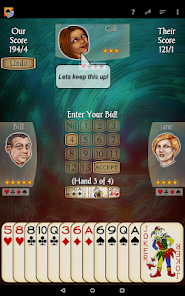
Spades boasts an easy-to-navigate interface designed for players of all ages. With clear visuals and straightforward controls, you can quickly jump into the action without any steep learning curve, ensuring a seamless gaming experience from start to finish.

Multiplayer Mode

Enjoy thrilling matches with friends or players from around the world in Spades' multiplayer mode. Team up with a partner or challenge solo opponents, fostering a competitive environment that keeps you coming back for more, no matter your skill level.

Pros & Cons

Pros
  • Spades fosters teamwork and strategic thinking among players.
  • The game enhances communication skills through collaboration and discussion.
  • It's easy to learn, making it accessible for all ages.
  • Spades promotes friendly competition, creating engaging social interactions.
  • The game can be played casually or competitively, offering flexibility.
Cons
  • Spades can lead to conflicts over bidding and strategy disagreements.
  • The game often requires a significant time commitment for thorough play.
  • Limited player interaction may reduce social engagement during gameplay.

Real Experience Using Spades

Application Scenarios

Spades is a versatile card game app that caters to both casual players and serious enthusiasts. Whether you’re enjoying a relaxing evening at home, looking to pass time during your commute, or connecting with friends remotely, Spades fits perfectly into any scenario. The app allows for both single-player and multiplayer modes, making it easy to engage with friends or challenge random opponents. With various game modes available, including classic Spades and variations like Mirror and Suicide, players can choose their preferred style and difficulty level. This flexibility keeps the gameplay fresh and engaging, allowing users to tailor their experience based on their mood or the company they keep.

User Experience

The user experience in Spades is designed with simplicity and enjoyment in mind. The interface is clean and intuitive, making it easy for players of all skill levels to navigate the app. The graphics are vibrant, and the animations smooth, which adds to the overall enjoyment of the game. Players appreciate the option to customize their avatars and table settings, allowing for a personalized gaming experience. Additionally, the app includes helpful tutorials and tips for beginners, ensuring that new players can quickly learn the rules and strategies of Spades. The matchmaking system is efficient, connecting players with similar skill levels to promote fair and competitive gameplay. Overall, users consistently report high satisfaction levels, thanks to the engaging gameplay and seamless interface.

Pricing

Spades operates on a freemium model, allowing users to download the app and access basic features without any cost. This makes it accessible for anyone interested in the game. For players seeking an enhanced experience, the app offers a premium subscription that unlocks additional features such as exclusive game modes, ad-free gameplay, and special in-game items. The pricing is competitive, providing great value for those who wish to elevate their gaming experience. Regular promotions and discounts also make upgrading more appealing, allowing users to explore premium features without a significant financial commitment.

Updates & Support

The development team behind Spades is committed to providing regular updates, ensuring that the app remains engaging and bug-free. Users can expect new features, seasonal events, and gameplay enhancements, which keep the community active and involved. The support team is responsive and accessible, offering assistance through multiple channels including in-app support, email, and social media. This dedication to user feedback and continuous improvement demonstrates the developers' commitment to enhancing the overall experience. Players can confidently rely on the app's robust support system for any issues they may encounter, ensuring a smooth gaming experience.

verified Security & Privacy Review

The Spades app prioritizes user security and privacy through a robust framework designed to protect personal information. It employs end-to-end encryption for in-game communications, ensuring that messages between players remain confidential and secure from unauthorized access. Regarding data collection, Spades is transparent about its practices. The app collects minimal personal data necessary for account creation and gameplay. Users are informed about the types of data gathered, which may include device information and gameplay statistics. However, sensitive information such as financial details is not requested, reinforcing user trust. The app requires basic permissions, including access to the device’s storage and network connectivity, which are essential for smooth gameplay. Users can manage these permissions through their device settings, allowing for greater control over their data. Overall, Spades demonstrates a commitment to safeguarding user privacy and adheres to industry standards for data protection. Regular updates and security patches further enhance the app's resilience against potential vulnerabilities, making it a safe choice for players who value their privacy.

Reviews

4.6

“Fun gameplay and great for friends!”

“Easy to learn, hard to master.”

“Graphics are simple but charming.”

“AI opponents are challenging and engaging.”

“Perfect for casual gaming sessions.”

Compare APP

FAQ

1

Can I submit suggestions or feedback to Spades?

Yes, users can submit suggestions or feedback through the app’s feedback feature or by contacting customer support via the official website.

2

Does Spades collect my personal data?

Yes, Spades may collect personal data in accordance with its privacy policy, which typically includes information such as your username, game statistics, and interaction data.

3

Does Spades support offline use?

No, Spades requires an internet connection to play, as it is designed for online multiplayer gameplay.

4

How do I cancel my Spades subscription?

You can cancel your Spades subscription through your app store settings or account settings within the app, following the provided instructions for managing subscriptions.

5

How much does a subscription to Spades cost?

The subscription costs may vary, but typically range from $4.99 to $9.99 per month, depending on the features included.

How to use Spades

1

Can I change my customer number if needed?

Unfortunately, customer numbers cannot be changed. If you have concerns, please contact customer service for further assistance.

2

How can I activate my Spades account?

To activate your Spades account, click the activation link in your registration email and follow the prompts. If you encounter issues, reach out to customer service.

3

How do I contact customer service for help with my Spades account?

You can reach our customer service team by emailing support

4

How do I log in if I've forgotten my password?

Click on the "Forgot Password?" link on the login page to receive a reset link via email. If you need further assistance, please contact customer service.

5

How do I update my account information after logging in?

After logging in, go to the account settings section where you can update your information. If you encounter issues, contact customer service for help.

Editor's Choice