This site uses cookies to enhance your user experience. By clicking any link on this site you are giving your consent to our cookie policy. Read more
Reject
Accept All

Advertiser and Editorial Disclosures

Rec Room

Rec Room

verified Verified App

Developer: Rec Room

  • category

    Category: Adventure

  • price

    Price: 0

  • age rating

    Age Rating: Everyone

  • rating

    Rating: 4.5

  • download

    Downloads: /

  • version

    Version: 2024092707

Screenshot 1
Screenshot 2
Screenshot 3
Screenshot 4
Screenshot 5
Screenshot 6
Screenshot 7
Screenshot 8

Features & Highlights

Cross-Platform Play

Play Rec Room on various devices, including VR headsets, gaming consoles, and PC. This cross-platform capability ensures that you can connect and interact with friends, regardless of the device they're using, making it easy to enjoy shared experiences anytime, anywhere.

Custom Room Creation

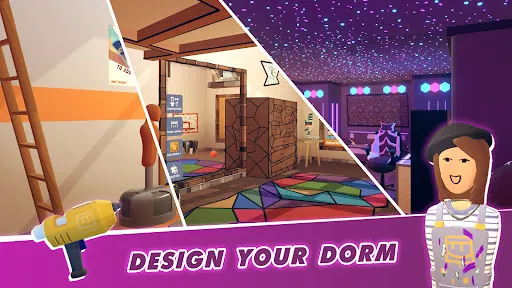
Unleash your creativity by designing your own rooms in Rec Room! With a variety of tools and assets, you can create unique experiences for yourself and others, from cozy hangout spots to exciting game arenas, allowing your imagination to run wild.

Diverse Game Modes

Explore a wide range of games and activities within Rec Room, including paintball, quest adventures, and escape rooms. Whether you prefer competitive gameplay or cooperative challenges, there's always something new and exciting to try with friends or fellow players.

Social Interaction

Rec Room is all about connecting with friends and meeting new people in a vibrant virtual space. You can chat, play games, and collaborate on creative projects, making it a perfect hub for socializing and building relationships in a fun and engaging environment.

Pros & Cons

Pros
  • Rec Room offers a vibrant social environment for meeting new friends.
  • It provides endless creative opportunities through customizable rooms and games.
  • The platform supports cross-play, connecting users across different devices seamlessly.
  • Regular updates introduce fresh content and experiences, keeping gameplay exciting.
  • User-generated content empowers players to create and share their own games.
Cons
  • Limited content creation tools hinder user creativity and customization.
  • Performance issues can disrupt gameplay and user experience.
  • The social environment may expose users to harassment or negative interactions.

Real Experience Using Rec Room

Application Scenarios

Rec Room is a versatile social platform that thrives on user-generated content, allowing players to create, share, and experience a myriad of activities in a virtual reality setting. Whether you are looking to engage in competitive games, collaborate on creative projects, or simply relax with friends, Rec Room has something for everyone. Users can participate in various activities, including paintball, dodgeball, and even role-playing games. The application is designed to accommodate both casual and dedicated gamers, making it ideal for family gatherings, team-building exercises, or solo adventures. The ability to create custom rooms adds a layer of personalization, allowing users to tailor their experiences and showcase their creativity.

User Experience

The user experience in Rec Room is both engaging and intuitive. Upon entering the virtual space, users are greeted with a vibrant and welcoming environment that encourages exploration and interaction. The controls are user-friendly, making navigation seamless for both VR veterans and newcomers. Users can easily connect with friends or meet new people through various social hubs. The in-game communication tools, including voice chat and emotive gestures, enhance the sense of community and make interactions feel genuine. The graphics are colorful and well-designed, contributing to an immersive atmosphere that invites users to return frequently. However, some users have reported occasional bugs and performance issues, particularly in larger rooms, which can detract from the overall experience.

Pricing

Rec Room operates on a freemium model, allowing users to download and play the game at no cost. This accessibility has contributed to its growing popularity, as players can join the platform without any financial commitment. While the core features are free, there are optional in-game purchases available, such as cosmetic items and customizations. These purchases help support the ongoing development of the game but are not necessary for enjoying the main features. Users often appreciate this model, as it allows them to engage with the community without feeling pressured to spend money upfront.

Updates & Support

Rec Room is continually evolving, with regular updates that introduce new features, fix bugs, and expand the creative possibilities for users. The developers are responsive to community feedback, often integrating suggestions into future updates, which fosters a sense of ownership among players. The support system is robust, with a dedicated help center and community forums where users can seek assistance or share their experiences. The active community contributes to the app's longevity, ensuring that there is always something new to explore and enjoy. Overall, Rec Room stands out as a uniquely engaging platform that successfully blends gaming, creativity, and social interaction.

verified Security & Privacy Review

Rec Room takes user security and privacy seriously, implementing various measures to protect personal information. The app employs encryption protocols to safeguard data transmitted between users and its servers, ensuring that sensitive information remains secure. Additionally, Rec Room adheres to strict privacy policies that outline how user data is collected, used, and shared. When it comes to permissions, Rec Room requires access to certain device features, such as the camera and microphone, to enhance the social experience. Users are informed of these permissions upfront, and they have the option to manage them through their device settings. This transparency fosters trust and allows users to make informed decisions regarding their privacy. Rec Room does not sell user data to third parties, and it provides options for users to control their visibility and interactions within the app. The platform also incorporates reporting and blocking features, empowering users to maintain their safety while engaging in the virtual environment. Overall, Rec Room demonstrates a commitment to protecting user privacy and ensuring a secure social experience.

Reviews

4.5

“Fun social experiences with friends”

“Creative game design and customization”

“Great variety of activities and games”

“Occasional bugs but overall enjoyable”

“Community-driven content keeps it fresh”

FAQ

1

Can I submit suggestions or feedback to Rec Room?

Yes, users can submit suggestions or feedback through the official Rec Room website or within the app's community forums.

2

Does Rec Room collect my personal data?

Yes, Rec Room collects certain personal data to enhance user experience and for safety purposes, but they provide privacy controls for users.

3

Does Rec Room support offline use?

Rec Room requires an internet connection to access its features and social functionalities, so offline use is not supported.

4

How do I cancel my Rec Room subscription?

You can cancel your Rec Room subscription through the platform where you purchased it, such as the app store or the website, following their specific cancellation process.

5

How much does a subscription to Rec Room cost?

Rec Room offers a subscription called Rec Room Plus, which provides additional features for a monthly fee, typically around $5.99, but prices may vary.

How to use Rec Room

1

Can I change my customer number if I need to?

Unfortunately, customer numbers are unique and cannot be changed once assigned. Contact customer service for further assistance.

2

How can I log in if I don't remember my password?

Click on the "Forgot Password?" link on the login page to reset your password via email.

3

How do I activate my Rec Room account?

To activate your account, click the activation link sent to your email after registration. If you didn’t receive it, check your spam folder.

4

How do I contact customer service for help with my account?

You can reach customer service through the support page in Rec Room or by emailing support

5

How do I verify my account if I cannot log in?

If you can't log in, check your email for a verification link or reset your password to regain access to your account.

Editor's Choice